
How do you find duplicate receipts? Start with the files, not the folder. A thermal photo and an emailed PDF of the same $14.82 coffee are one expense, even when one line says STARBUCKS #1842 and the other says SBUX 1842. Done is one ledger row per real tap. The second file is evidence, marked copy, not a second total.
For the duplication-detection job itself — collapsing paper, email, and a card line into one flagged row — see receipt duplication detection.
Wednesday morning. You photograph the fading thermal on the counter. By lunch the loyalty email drops a PDF of the same latte. Two files land in Camera Roll and Inbox. If both become expense rows, March meals are wrong by $14.82 before anyone notices. The same trap shows up as an Amazon order email next to a packing-slip photo: same purchase, two carriers.
Three rules, in this order
You do not need a model score. You need three checks, run in order:
- Same vendor + same total + same day. Boring, high-confidence. Most true duplicates stop here.
- Paper + email within about three days. The slip in your pocket and the message that arrives after you tap to pay are often the same purchase on two carriers.
- Fuzzy merchant. STARBUCKS #1842 and SBUX 1842 are one store. Card networks and printers shorten names. Exact string match alone will miss the pair.
If a tool shows a confidence number, ask which of those three fired. That is the score.
One purchase, one row
The one-row rule is the finish line. One real tap equals one ledger row with date, vendor, total, and tax when the slip shows it. A second file for the same purchase stays linked as a copy. Do not sum it again. Two real coffees the same morning keep two rows when the totals differ. A card statement line is not the merchant receipt; link the slip.
A worked week of pairs
Five lines. Two are copies. Three stay. Amounts are plausible examples for the scene, not a named case study.
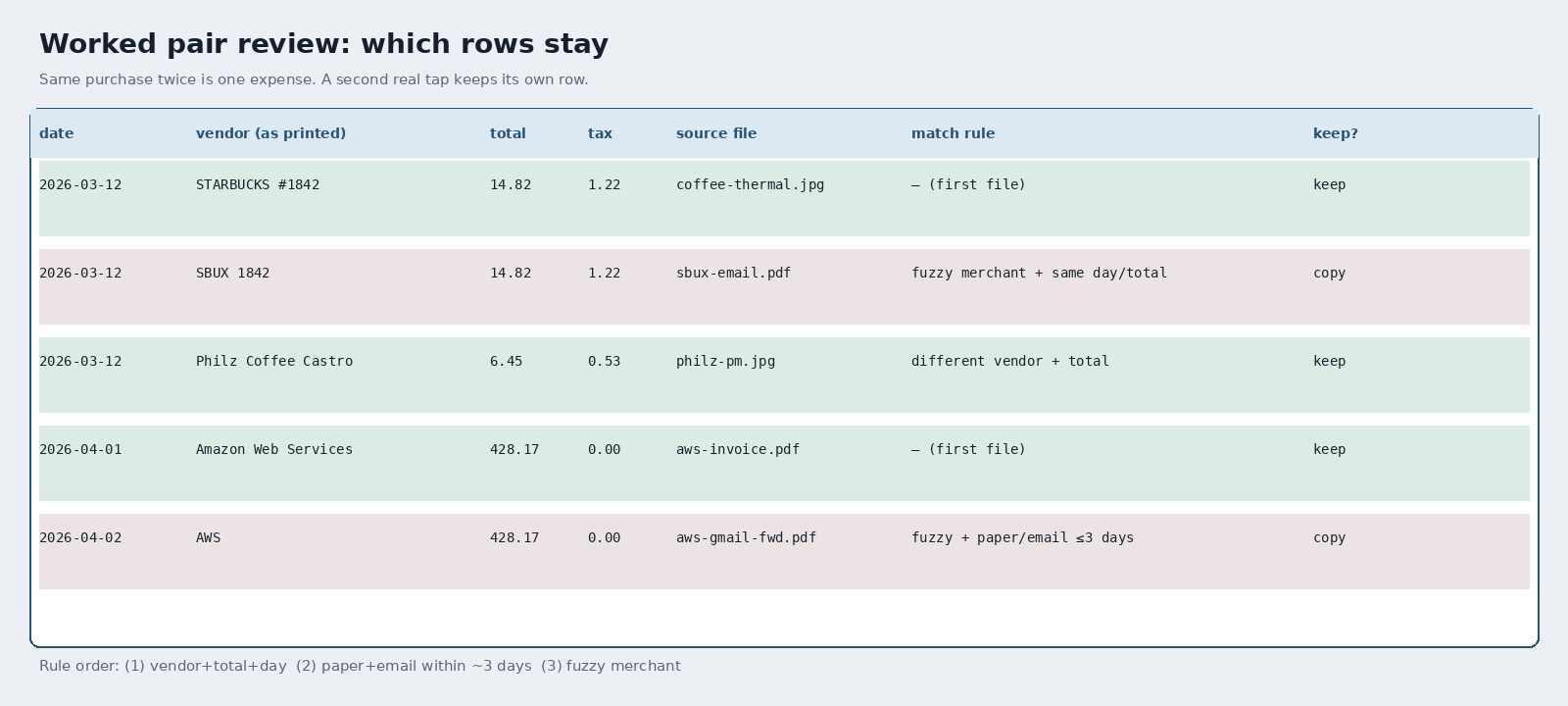
| date | vendor (as printed) | total | tax | source file | match rule | keep? |
|---|---|---|---|---|---|---|
| 2026-03-12 | STARBUCKS #1842 | 14.82 | 1.22 | coffee-thermal.jpg | (first file) | keep |
| 2026-03-12 | SBUX 1842 | 14.82 | 1.22 | sbux-email.pdf | fuzzy merchant + same day/total | copy |
| 2026-03-12 | Philz Coffee Castro | 6.45 | 0.53 | philz-pm.jpg | different vendor + total | keep |
| 2026-04-01 | Amazon Web Services | 428.17 | 0.00 | aws-invoice.pdf | (first file) | keep |
| 2026-04-02 | AWS | 428.17 | 0.00 | aws-gmail-fwd.pdf | fuzzy + paper/email within ~3 days | copy |
Row 2 is the same latte as row 1: fuzzy merchant, same total, same day, paper plus email. Keep one. Row 3 is a real second tap at Philz. Same morning, different vendor and total. Keep. Rows 4 and 5 are the AWS invoice and a forwarded Gmail of that invoice a day later. Fuzzy name, paper/email window, same total. Mark the forward as copy.
Photo, PDF, or forward into reviewed rows, then a CSV or Sheets file you own. Slipsheet lands those columns so you can run the three rules without retyping every slip. Soft land only: you still decide keep versus copy.
OCR can read both copies. Rules decide keep.
OCR is the mechanism that fills vendor, date, total, and tax from each file. It does not know which file is the duplicate. A local Q2 2026 run on n=20 synthetic receipts (Tesseract, dumb OCR / Drive-like extract) is why columns matter: Vendor 95%, Date 100%, Total 100%, Tax 60%, all four fields 55% (11/20). Ground-truth sum $2,034.43 matched the OCR-parsed sum. Treating OCR like a searchable folder, every receipt (20/20) still had 2+ currency-like amounts, avg 6.05 matches per receipt (121 across the corpus). Both copies of a coffee can OCR cleanly. Match rules on the columns decide which row stays.
A few straight answers
How do you detect duplicate receipts?
Line up vendor, date, and total. Then ask whether the second file is the other copy of the same tap (paper plus email, or the same image uploaded twice). Same store and same morning is not enough if the totals differ.
What is receipt duplication detection?
Telling one purchase stored twice from two real expenses that share a vendor. It is a field comparison, not a hash of the photo file.
Paper and email of the same coffee: which one do I keep?
Either. The fields match. Keep the copy you can still read. Thermal fades. Email does not. Mark the other as copy and leave the total alone.
Two coffees the same morning: will that flag?
Only if vendor, total, and day align (or fuzzy merchant plus the paper/email window). A $14.82 latte and a $6.45 Philz drip are two expenses.