How to Organize Receipts for Bookkeeping: A Step-by-Step Guide
Keeping track of business expenses is a fundamental aspect of sound financial management, yet for many, the task of organizing receipts can feel like an overwhelming chore. Piles of paper, forgotten email attachments, and missed deductions are common frustrations. However, maintaining an organized system for your receipts is not just about avoiding a messy desk; it is critical for accurate bookkeeping, tax compliance, and informed financial decision-making. A well-structured approach can save you time, reduce stress, and ensure you capture every valuable deduction.
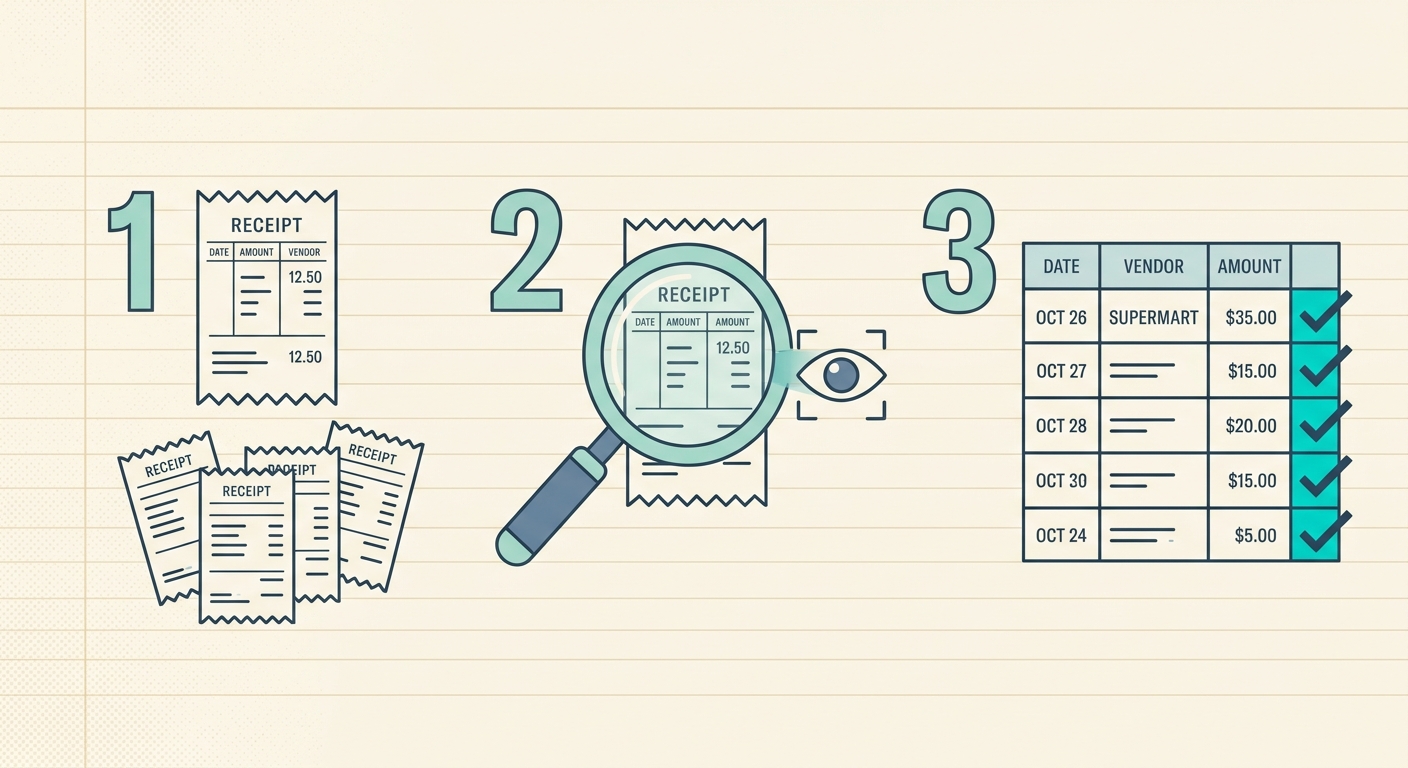
This comprehensive guide will walk you through a streamlined process to effectively organize receipts for bookkeeping, transforming a daunting task into a manageable routine. We will cover everything from initial capture to final export, showing you how modern tools, specifically SlipSheet, can revolutionize your expense management.
What You Need to Get Started
Before diving into the process, ensure you have the right tools at your disposal. Modern technology has made receipt management significantly easier, moving away from manual data entry and physical filing cabinets.
- A Smartphone with a Camera: Essential for capturing physical receipts on the go.
- Reliable Internet Connection: For uploading and processing digital information.
- A Dedicated Digital Receipt Management Tool: This is where SlipSheet truly shines. It is designed to turn your receipt photos and email receipts into structured spreadsheet rows effortlessly.
- Basic Understanding of Your Business Expense Categories: Knowing common categories, such as office supplies, travel, or utilities, will help you classify expenses accurately.
Phase 1: Create a Simple Capture Habit
The first and most crucial step in effective receipt organization is establishing a consistent habit for capturing receipts as soon as they are generated. Procrastination is the enemy here; letting receipts pile up makes the task exponentially harder. The goal is to make capturing a seamless, almost automatic part of your daily routine.
- Capture Physical Receipts Immediately: Whenever you make a business purchase, take a photo of the receipt right away. Do not wait until you get back to the office or home. Ensure the photo is clear, well-lit, and captures all essential details, including the vendor name, date, total amount, and itemized list.
- Forward Email Receipts Promptly: For online purchases or services that send digital receipts, forward them to a dedicated email address or directly to your receipt management tool. SlipSheet can integrate with your email, allowing you to forward receipts directly for processing, eliminating manual steps.
- Be Consistent: Whether it is daily or weekly, set a schedule for processing any accumulated receipts. A consistent rhythm prevents overwhelming backlogs and ensures no expense is overlooked.
Phase 2: Convert Each Receipt into Structured Data
Once receipts are captured, the next vital step is to transform them from raw images or emails into usable, structured data. This is often the most time-consuming part of traditional bookkeeping, involving manual data entry into spreadsheets or accounting software. This is precisely where a tool like SlipSheet provides immense value, automating the extraction process and ensuring accuracy.
- Upload Photos to SlipSheet: Simply upload the photos you took of your physical receipts to SlipSheet. Its intelligent technology analyzes the image, identifies key data points like vendor, date, amount, and even individual line items, then converts them into a clean, spreadsheet-ready format.
- Process Email Receipts Automatically: If you have forwarded email receipts to SlipSheet, it will automatically parse the content, extracting the same critical information. This means no more copy-pasting details from emails into your records.
- Categorize and Tag Transactions: Within SlipSheet, you can easily assign each transaction to the appropriate expense category. You can also add custom tags or notes, which is incredibly useful for project-specific expenses or further categorization needed for your bookkeeping system.
- Verify Extracted Data: While SlipSheet boasts high accuracy, a quick review of the extracted data is always recommended. This ensures everything is correctly captured and categorized before it becomes a permanent part of your records.
Phase 3: Review Totals Before Month-End
Regular review is a cornerstone of accurate bookkeeping. Waiting until tax season to reconcile all your expenses can lead to significant headaches and potential errors. By reviewing your totals before month-end, you can catch discrepancies early, ensure all receipts are accounted for, and maintain a clear picture of your financial health.
- Set a Recurring Reminder: Schedule a specific time each month, perhaps the last Friday, to review your accumulated expenses. This dedicated time slot helps you stay on track.
- Check for Missing Receipts: Use your bank or credit card statements as a cross-reference. If you see a transaction that is not reflected in your SlipSheet data, you will know you are missing a receipt and can take steps to retrieve it or document the expense accordingly.
- Verify Expense Categories and Amounts: Double-check that all transactions are correctly categorized and that the amounts match your receipts. Correcting errors at this stage is much simpler than later.
- Ensure All Transactions Are Accounted For: A thorough review confirms that every business expense has been captured, processed, and categorized, leaving no room for missed deductions.
Phase 4: Export the Data for Your Accountant or Bookkeeping System
The final phase involves integrating your meticulously organized data with your primary accounting system or sharing it with your accountant. The beauty of using a tool like SlipSheet is that it prepares your data in a universally compatible format, making this step incredibly straightforward.
- Utilize SlipSheet's Export Features: SlipSheet allows you to export your organized data into various formats, most commonly CSV (Comma Separated Values) files. These files contain all the extracted details, categories, and any notes you have added, perfectly structured for import.
- Import Data into Accounting Software: Most popular accounting software, such as QuickBooks, Xero, or FreshBooks, supports CSV imports. This means you can easily transfer all your categorized receipt data into your accounting system with just a few clicks, saving hours of manual data entry.
- Share Organized Reports Directly: If you work with an external bookkeeper or accountant, you can simply provide them with the exported CSV files or grant them access to your SlipSheet account. This provides them with clean, categorized data, significantly reducing their workload and potentially lowering your bookkeeping fees.
Common Mistakes to Avoid When Organizing Receipts
Even with the best tools and intentions, certain pitfalls can derail your receipt organization efforts. Being aware of these common mistakes can help you navigate around them effectively.
- Procrastination: Letting receipts pile up is the number one mistake. It creates a daunting task that is easy to put off, leading to lost receipts and missed deductions.
- Lack of Consistency: Jumping between different methods or not sticking to your chosen system can lead to disorganization and confusion. Establish a routine and adhere to it.
- Ignoring Digital Receipts: Treating email receipts as less important than paper ones is a mistake. They contain the same vital information and need to be processed just as diligently.
- Misplacing Receipts: Whether physical or digital, keeping receipts scattered makes them difficult to find when needed. Centralize your capture and storage using a tool like SlipSheet.
- Not Backing Up Data: Relying solely on physical receipts or a single digital copy is risky. Ensure your digital records are securely backed up, ideally in a cloud-based system like SlipSheet.
Organizing receipts for bookkeeping does not have to be a dreaded task. By adopting a systematic approach, leveraging powerful tools like SlipSheet, and committing to consistent habits, you can transform your expense management. This not only ensures accuracy and compliance but also frees up valuable time and mental energy, allowing you to focus on what truly matters: growing your business.
Ready to streamline how you organize receipts for bookkeeping? Visit slipsheet.app today and transform your receipt management process.
FAQ
Why is it important to organize receipts for bookkeeping?
Organized receipts are crucial for accurate financial records, tax compliance, and making informed business decisions. They provide undeniable proof of expenses, preventing potential discrepancies or issues during audits.
How often should I organize my receipts?
Ideally, you should process receipts daily or weekly to prevent accumulation and ensure accuracy. Regular processing with digital tools like SlipSheet makes this habit easy to maintain and less time-consuming.
Can I use digital copies of receipts for tax purposes?
Yes, the IRS and most tax authorities accept legible digital copies of receipts as valid documentation, provided they contain all necessary information. Always ensure your digital records are securely backed up.
What kind of information should a receipt contain for bookkeeping?
A valid receipt should clearly include the vendor's name, the date of purchase, the total amount paid, a description of the goods or services, and the method of payment. SlipSheet helps capture and organize all this vital data efficiently.
What if I lose a receipt?
If a receipt is lost, try to obtain a duplicate from the vendor or use bank statements and other supporting documentation as proof of purchase. Consistent use of a digital system like SlipSheet significantly reduces the risk of loss by capturing receipts immediately.