
If you want a free engine that runs on your own computer, RapidOCR beat Tesseract on clean receipts in our test: 15 of 20 fully right against 11, and about 3 times faster. But on phone snap photos both engines got 0 of 20 right, and RapidOCR's misses came back as wrong numbers, not blanks. Swapping engines fixes clean scans. It does not turn a camera roll into a ledger.
We first measured Tesseract on 20 synthetic receipts under six capture conditions. Then we ran an actual alternative, RapidOCR, on the same images with the same parser, so the question "what is the best Tesseract alternative" has numbers behind it. Here is what each engine got right, what broke, and what you still have to build after the OCR finishes.
What we ran
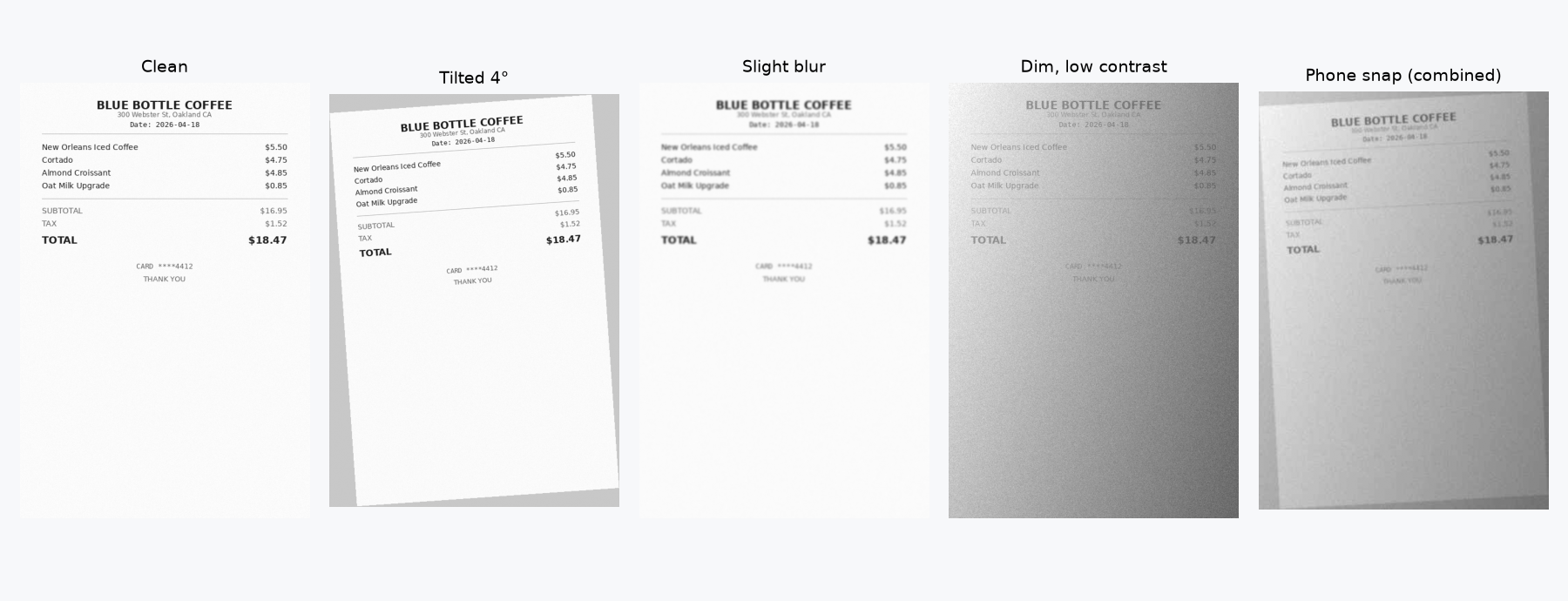
The same 20 synthetic Q2 2026 receipts used in our OCR text is not a ledger write up: SaaS invoices, restaurants, rideshare, office supplies and hardware. Each image went through the same six capture conditions and the same simple regex parser for vendor, date, total and tax. A receipt counted as fully right only when all four fields matched the ground truth (vendor exact after normalizing, date exact, total and tax within $0.01). The ground truth sum of totals was $2,034.43.
- Tesseract 5.5.0 through pytesseract, with grayscale and a 2x upscale (run October 6, 2026).
- RapidOCR 1.2.3 (rapidocr-onnxruntime, an open source ONNX port of PaddleOCR's models) with its default models on onnxruntime 1.31.1, CPU only (run October 26, 2026).
Caveats, stated plainly: these are synthetic receipts with simulated capture damage, not crumpled real thermal paper. There are 20 receipts per condition, one simple parser for both engines, default models and no tuning. A better parser would score higher. It cannot recover text the engine never read. We did not test EasyOCR, full PaddleOCR, cloud receipt APIs or Slipsheet in this run, so there are no accuracy claims here about any of them.
Results: Tesseract against RapidOCR
| Condition | Tesseract 5.5.0 | RapidOCR 1.2.3 | Totals right: Tesseract | Totals right: RapidOCR | Sum error: Tesseract | Sum error: RapidOCR |
|---|---|---|---|---|---|---|
| Clean render | 11/20 | 15/20 | 20/20 | 20/20 | $0.00 | $0.00 |
| Tilted 4 degrees | 7/20 | 0/20 | 17/20 | 20/20 | $85.44 | $0.00 |
| Slight blur (radius 1.5) | 0/20 | 6/20 | 19/20 | 20/20 | $2,001.21 | $0.00 |
| Dim, low contrast, noise | 0/20 | 2/20 | 0/20 | 20/20 | $1,980.68 | $0.00 |
| Chat app JPEG (half size, quality 25) | 0/20 | 0/20 | 18/20 | 13/20 | $701.20 | $3,582.97 |
| Phone snap (tilt, blur, shading, JPEG) | 0/20 | 0/20 | 0/20 | 8/20 | $1,558.68 | $7,604.65 |
On clean receipts the two engines failed in different places. Tesseract read vendor 19/20, date 20/20, total 20/20 but tax only 12/20. RapidOCR read tax 20/20, date and total 20/20, but vendor only 15/20, because it often drops the spaces between words: Blue Bottle Coffee came back as "BLUEBOTTLECOFFEE".
Speed for 20 receipts on our CPU: RapidOCR took 3.7 to 6.2 seconds per condition, Tesseract (with the 2x upscale) 8.3 to 20.9 seconds. On clean receipts that is 6.2 seconds against 20.5, about 3 times faster here.
Tilt is where RapidOCR lost. It got every total (20/20) but no tax (0/20). When the text lines slope, our simple line joining merges neighboring lines and the tax amount lands on the wrong line. That is partly our parser, not only the engine, and a smarter layout step would likely recover some of it.
| Condition | Vendor | Date | Total | Tax | Ready | Totals not found | Seconds for 20 |
|---|---|---|---|---|---|---|---|
| Clean render | 15/20 | 20/20 | 20/20 | 20/20 | 15/20 | 0 | 6.2 |
| Tilted 4 degrees | 15/20 | 17/20 | 20/20 | 0/20 | 0/20 | 0 | 4.5 |
| Slight blur (radius 1.5) | 15/20 | 6/20 | 20/20 | 20/20 | 6/20 | 0 | 3.7 |
| Dim, low contrast, noise | 15/20 | 17/20 | 20/20 | 5/20 | 2/20 | 0 | 4.8 |
| Chat app JPEG (half size, quality 25) | 14/20 | 0/20 | 13/20 | 0/20 | 0/20 | 0 | 4.8 |
| Phone snap (tilt, blur, shading, JPEG) | 14/20 | 0/20 | 8/20 | 0/20 | 0/20 | 1 | 5.2 |
Phone snaps: a blank you notice, a wrong number you don't
Under the phone snap combo, both engines got 0 of 20 receipts fully right, but they failed in opposite ways. Tesseract found no total at all on 17 of 20 receipts, so the sum of totals was off by $1,558.68. RapidOCR returned a total for 19 of 20, but only 8 were right and it got 0 of 20 dates. The sum of totals was off by $7,604.65.
A blank total is annoying, but you see it. A plausible wrong total goes straight into your sum. Here is what RapidOCR returned for one receipt:
BLUEBOTTLECOFFEE
55:50
ewCrieatistcedCoffee $475
Cortada $4.85
AimondCmpissant $0.85
OatMiROpgriade
SUSTOTAL
TAX $18.47
TOTAL
DANEYOM
The total, $18.47, ended up on the TAX line, and the TOTAL line has no number. Our parser reads that receipt as $18.47 of tax. Nothing in the output says anything went wrong.
The chat app JPEG showed the same pattern. RapidOCR got 13/20 totals and 0/20 dates, with the sum off by $3,582.97. Tesseract got 18/20 totals and 1/20 date, with the sum off by $701.20.
Tesseract in detail
| Condition | Vendor | Date | Total | Tax | Ready | Totals not found | Sum error vs $2,034.43 | Mean word confidence |
|---|---|---|---|---|---|---|---|---|
| Clean render | 19/20 | 20/20 | 20/20 | 12/20 | 11/20 | 0 | $0.00 | 94.2 |
| Tilted 4 degrees | 17/20 | 12/20 | 17/20 | 15/20 | 7/20 | 3 | $85.44 | 91.5 |
| Slight blur (radius 1.5) | 13/20 | 3/20 | 19/20 | 1/20 | 0/20 | 0 | $2,001.21 | 61.0 |
| Dim, low contrast, noise | 1/20 | 1/20 | 0/20 | 0/20 | 0/20 | 18 | $1,980.68 | 66.2 |
| Chat app JPEG (half size, quality 25) | 16/20 | 1/20 | 18/20 | 0/20 | 0/20 | 0 | $701.20 | 41.8 |
| Phone snap (tilt, blur, shading, JPEG) | 15/20 | 2/20 | 0/20 | 0/20 | 0/20 | 17 | $1,558.68 | 49.3 |
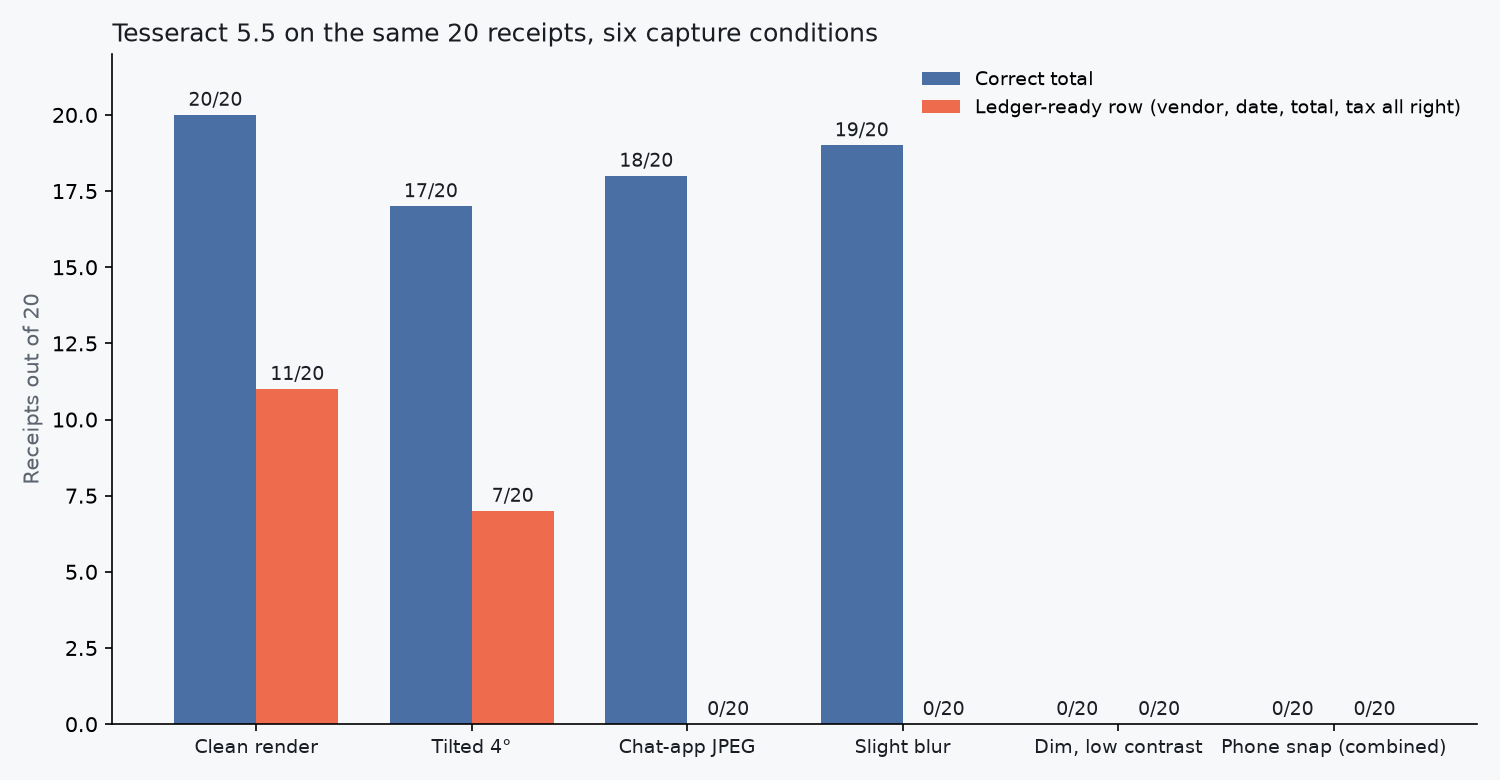
Slight blur is the clearest Tesseract trap. Totals looked fine at 19/20, but the Uber receipt's true total of $24.83 came back as 2026.04: the date fragment 2026-04 became the amount. That one wrong row pushed the column sum off by $2,001.21 against the $2,034.43 ground truth. "Mostly right" totals are not a ledger.
Tilt tells a different story. Mean Tesseract word confidence stayed at 91.5 (against 94.2 on clean), while fully right rows fell from 11 to 7 and eight dates went wrong. The engine looked sure and was wrong, and nothing flagged it.
The chat app JPEG turned Tartine's $32.60 into 812.90 and Figma's $180.00 into 100.90. Under the phone snap combo, 17 of 20 receipts produced no total at all.
Does the standard preprocess fix help Tesseract?
We tried autocontrast plus Otsu binarization on the four hard conditions. It made things worse or no better. Blur stayed at 0/20 fully right while correct totals fell from 19 to 5 and the sum error jumped to $22,906.13. The chat app JPEG stayed at 0/20 (totals fell from 18 to 12). Dim and phone snap each still missed 19 of 20 totals, with 0 fully right rows. Preprocessing cannot invent characters the OCR engine never saw.
Other alternatives we did not test
If you are shopping for an engine, EasyOCR and the full PaddleOCR toolkit are other free options you can run yourself. Cloud receipt APIs such as AWS Textract AnalyzeExpense, Google Document AI and the Azure receipt model return fields, not just text. We have no numbers for any of them in this test, so check each vendor's own documentation and try them on your own receipts.
OCR engine or receipt tool?
Any OCR engine's job ends at text. To get a ledger, something still has to:
- Pull vendor, date, total and tax out of that text, and tell a total from a subtotal.
- Normalize dates and currencies so rows sort and sum.
- Catch the rows that came back wrong before they reach your books.
- Export one stable row per receipt, not a pile of pages.
None of that is free work. Keep Tesseract or RapidOCR when your inputs are clean scans or born digital PDFs, when you mainly want searchable text, and when you have time to own the parser and the review step. Do not make either one your only receipt path when the inbox is phone photos, chat app forwards and faded thermal slips, the conditions that scored 0 fully right rows here. Our OCR receipt scanner overview covers that gap, and for capture tips before any OCR runs, see how to digitize receipts with your camera.
If you need one row per receipt
Slipsheet is a receipt tool that gives you rows, not text. Upload receipt images or PDFs (JPG, PNG, HEIC or PDF), or forward them by email on a paid plan, and each receipt becomes one row. You export one CSV, slipsheet-YYYYMMDD.csv, with 9 columns: date, merchant, total_amount, currency, tax_amount, category, client_tag, notes and file_name. On Pro, rows can also sync to Google Sheets, and QuickBooks or Xero take the CSV as an import. We did not measure Slipsheet in this test, so check the rows against your receipts, as you would with any tool. There is a 14-day free trial with no card. For a side by side, see OCR receipt scanner vs Slipsheet.
FAQ
What is the best free alternative to Tesseract for receipts?
In our test it was RapidOCR 1.2.3, an open source ONNX port of PaddleOCR's models. On 20 clean synthetic receipts it got 15 fully right against 11 for Tesseract 5.5, and it ran about 3 times faster. We did not test EasyOCR, full PaddleOCR or cloud receipt APIs.
Is RapidOCR better than Tesseract?
On clean, blurred and dim receipts in our test, yes. On a 4 degree tilt Tesseract did better, 7 of 20 against 0, partly because of our simple line joining. On phone snap photos both got 0 of 20 receipts fully right, so neither engine is enough on its own for camera photos.
Why does OCR fail on phone photos of receipts?
Phone photos stack tilt, blur, shading and compression at once, and every one of those costs characters. In our phone snap test Tesseract found no total on 17 of 20 receipts. RapidOCR returned a total for 19 of 20, but only 8 were right, which put the sum of totals off by $7,604.65.
Is OCR text the same as an expense ledger?
No. OCR gives you lines of text. A ledger needs one checked row per receipt with the vendor, date, total and tax in the right columns. Something still has to tell the total from the subtotal, fix dates, and catch the rows that came back wrong before they reach your books.