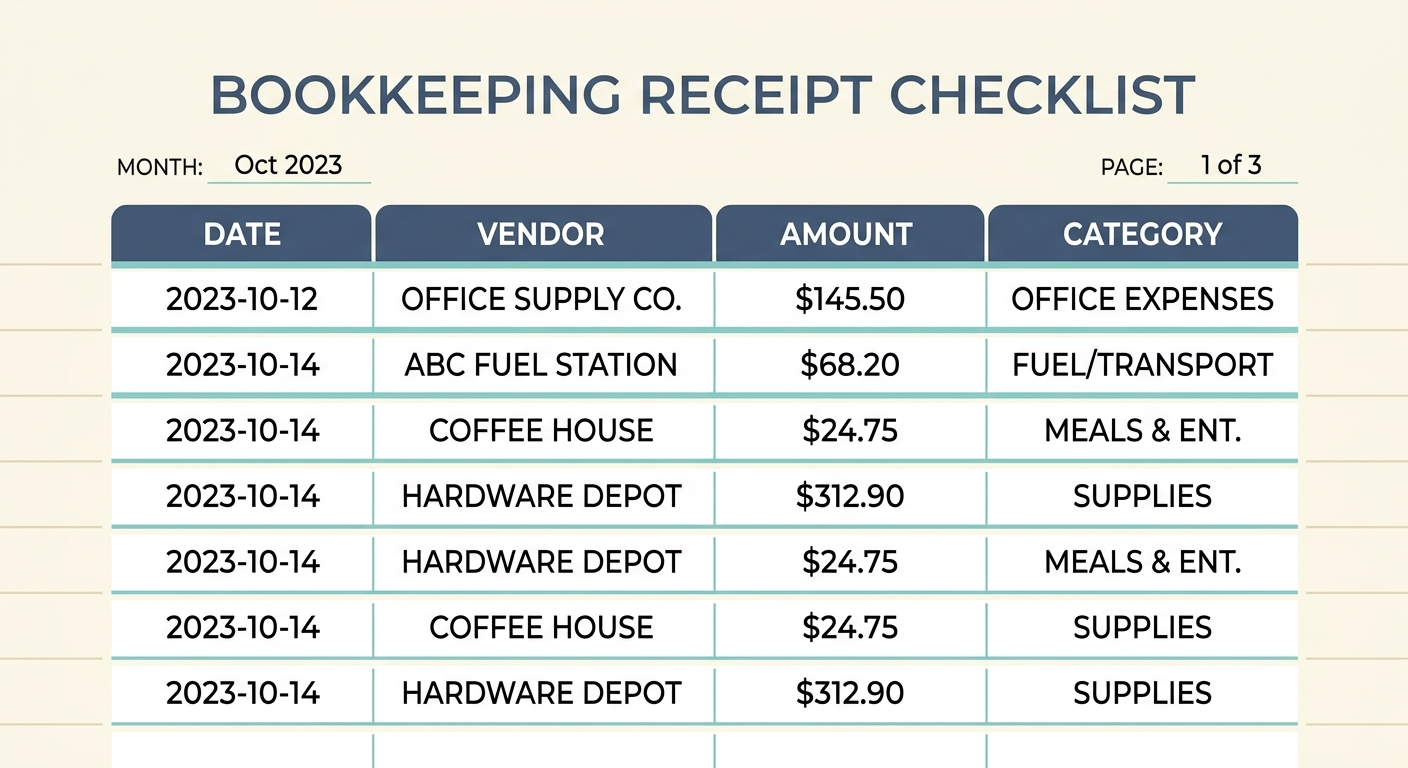
Your Essential Bookkeeping Receipt Checklist for Seamless Financial Management
Managing receipts can feel like a never-ending chore, a pile of paper and digital files threatening to overwhelm your bookkeeping efforts. However, a well-defined bookkeeping receipt checklist is not just a luxury; it is an absolute necessity for accurate financial records, tax compliance, and insightful business analysis. Without a clear system, you risk missing crucial deductions, miscategorizing expenses, and facing headaches during tax season.
This comprehensive guide will walk you through creating and implementing an effective receipt management system. We will explore what makes a robust checklist, the key data points to capture, and how modern tools like SlipSheet can transform this often-tedious task into a streamlined, efficient process. Get ready to turn your receipt chaos into financial clarity.
Mastering Your Money: What is a Bookkeeping Receipt Checklist?
At its core, a bookkeeping receipt checklist is a systematic guide designed to ensure every expense receipt is captured, processed, and recorded accurately and consistently. Think of it as your step-by-step instruction manual for handling financial evidence. It standardizes the often-messy process of expense tracking, moving you from reactive receipt management to proactive financial control.
The primary purpose of such a checklist is threefold: to maintain impeccable records for audit purposes, to accurately reflect your business's financial health, and to maximize legitimate tax deductions. By following a consistent process, you minimize errors, reduce stress, and gain a clearer picture of where your money is going. This not only aids in compliance but also empowers you to make smarter financial decisions.
Essential Data Points: Key Fields for Your Receipt Records
For every receipt, certain pieces of information are critical for proper bookkeeping. Whether you are manually entering data or using an automated solution, ensuring these fields are captured is paramount. These data points form the backbone of your expense tracking and are vital for both internal analysis and external audits.
- Date of Transaction: The exact date the expense occurred. This is crucial for matching bank statements and determining the correct accounting period.
- Vendor Name: Who you paid. This identifies the supplier or service provider.
- Total Amount: The full cost of the transaction, including taxes.
- Tax Amount (if applicable): Separating sales tax or VAT can be important for various tax filings and reclaiming purposes.
- Category: Assigning an expense category, such as 'Office Supplies', 'Travel', 'Utilities', or 'Marketing', helps organize your financial data and directly impacts your profit and loss statement.
- Payment Method: How the transaction was paid, e.g., credit card, debit card, cash. This helps reconcile with bank and credit card statements.
- Description/Purpose: A brief explanation of what was purchased and why it was a business expense. This context is invaluable for remembering details later and justifying expenses.
Tools like SlipSheet excel at extracting these exact data points from various receipt formats, transforming a photo of a paper receipt or an email receipt into structured data ready for your spreadsheet. This automation significantly reduces manual entry errors and saves valuable time.
Putting it into Practice: How to Implement Your Bookkeeping Receipt Checklist
Implementing your checklist requires discipline and the right tools. Here is a practical, step-by-step approach incorporating our recommended checklist items:
-
Collect Receipts Weekly:
Do not let receipts pile up. Dedicate a specific time each week, perhaps Friday afternoon, to gather all physical and digital receipts. For physical receipts, a designated folder or envelope works well. For digital receipts, create an email rule to forward them to a specific inbox, or use a tool that integrates directly with your email.
-
Extract Totals and Taxes:
This is where efficiency is key. Instead of manually typing out every detail, leverage technology. Take a photo of your paper receipts or forward your email receipts to SlipSheet. The tool will automatically extract the date, vendor, total amount, and tax components, populating these fields for you, saving countless hours.
-
Review Duplicates:
Before final processing, quickly scan for any duplicate entries. This can happen if a receipt was submitted twice or if a digital receipt was also printed. Removing duplicates ensures your expenses are not overstated, maintaining the integrity of your financial records.
-
Assign Categories:
Categorize each expense according to your chart of accounts. This step is critical for accurate financial reporting and tax preparation. Ensure consistency in your categorization; for example, always classify 'pens and paper' as 'Office Supplies'. Many tools, including SlipSheet, allow for easy category assignment during or after data extraction.
-
Export a Monthly Spreadsheet:
Once all receipts for the month have been collected, processed, and categorized, export the data into a spreadsheet format, such as CSV or Excel. This creates a consolidated, organized record of all your expenses, ready for your accounting software or for review by your bookkeeper. This monthly export provides a clear financial snapshot and is essential for reconciliation.
Tailoring Your Template: Customization for Unique Business Needs
While the core checklist items are universal, your business might have specific requirements that necessitate customization. Do not be afraid to adapt the template to better suit your operational realities.
Consider adding custom fields to your receipt records. For instance, a project-based business might add a 'Project ID' field to track expenses against specific client projects. A business with multiple locations might include a 'Location' field. You could also adjust the frequency of processing; a high-volume retail business might need daily processing, while a solo freelancer might manage fine with bi-weekly check-ins. The goal is to create a system that works seamlessly with your workflow, not against it. Regularly review your customized checklist to ensure it remains relevant and efficient as your business evolves.
Beyond the Basics: Receipt Checklist Variations for Different Business Types
The core principles of receipt management apply broadly, but different business types often benefit from specialized considerations in their checklists:
- Freelancers and Consultants: Focus heavily on categorizing expenses by client or project for accurate billing and profitability analysis. Ensure travel and home office expenses are meticulously recorded.
- Small Retailers: Emphasize tracking inventory purchases separately from operational expenses. Consider integration with Point of Sale (POS) systems for sales receipts, and use your checklist for supplier invoices.
- Service Providers (e.g., Plumbers, Electricians): Detailed tracking of material costs per job is crucial. Ensure subcontractor invoices are processed promptly. A field for 'Job Number' is often indispensable.
- E-commerce Businesses: Focus on accurately separating product costs, shipping fees, and marketing expenditures. Digital receipts from online suppliers will be the norm, making tools like SlipSheet particularly valuable for automated extraction.
Understanding the nuances of your business sector allows you to refine your checklist, ensuring it captures the most relevant financial information for your specific operational and reporting needs.
Implementing a robust bookkeeping receipt checklist is a foundational step towards achieving financial clarity and efficiency in your business. By consistently collecting, extracting, reviewing, categorizing, and exporting your receipt data, you build a strong financial foundation. This systematic approach not only simplifies tax time but also provides invaluable insights into your business's spending habits, empowering you to make informed decisions for growth and profitability. Stop dreading receipt management and start embracing a streamlined system.
Ready to simplify your receipt processing? Discover how SlipSheet can turn your receipt photos and email receipts into organized spreadsheet rows with ease. Visit slipsheet.app today and take the first step towards effortless bookkeeping.
FAQ
Why is a bookkeeping receipt checklist important?
A bookkeeping receipt checklist ensures accurate financial records, simplifies tax preparation, and helps businesses track expenses effectively, preventing lost deductions and miscategorized spending.
What are the most crucial pieces of information to capture from a receipt?
Essential information includes the date of transaction, vendor name, total amount, tax amount, expense category, payment method, and a brief description of the purchase.
How often should I process my receipts using a checklist?
It is highly recommended to process receipts weekly to prevent overwhelming backlogs, maintain accuracy, and ensure timely financial reconciliation. Some businesses may opt for daily processing depending on volume.
Can digital receipts be included in this checklist?
Absolutely. Digital receipts, like email confirmations, are just as important as physical ones. Tools like SlipSheet can process both photo receipts and email receipts, integrating them into your system.
What should I do if I lose a receipt for a business expense?
If a receipt is lost, try to obtain a duplicate from the vendor or use bank or credit card statements as proof of purchase, along with a detailed explanation of the expense, to support your claim.