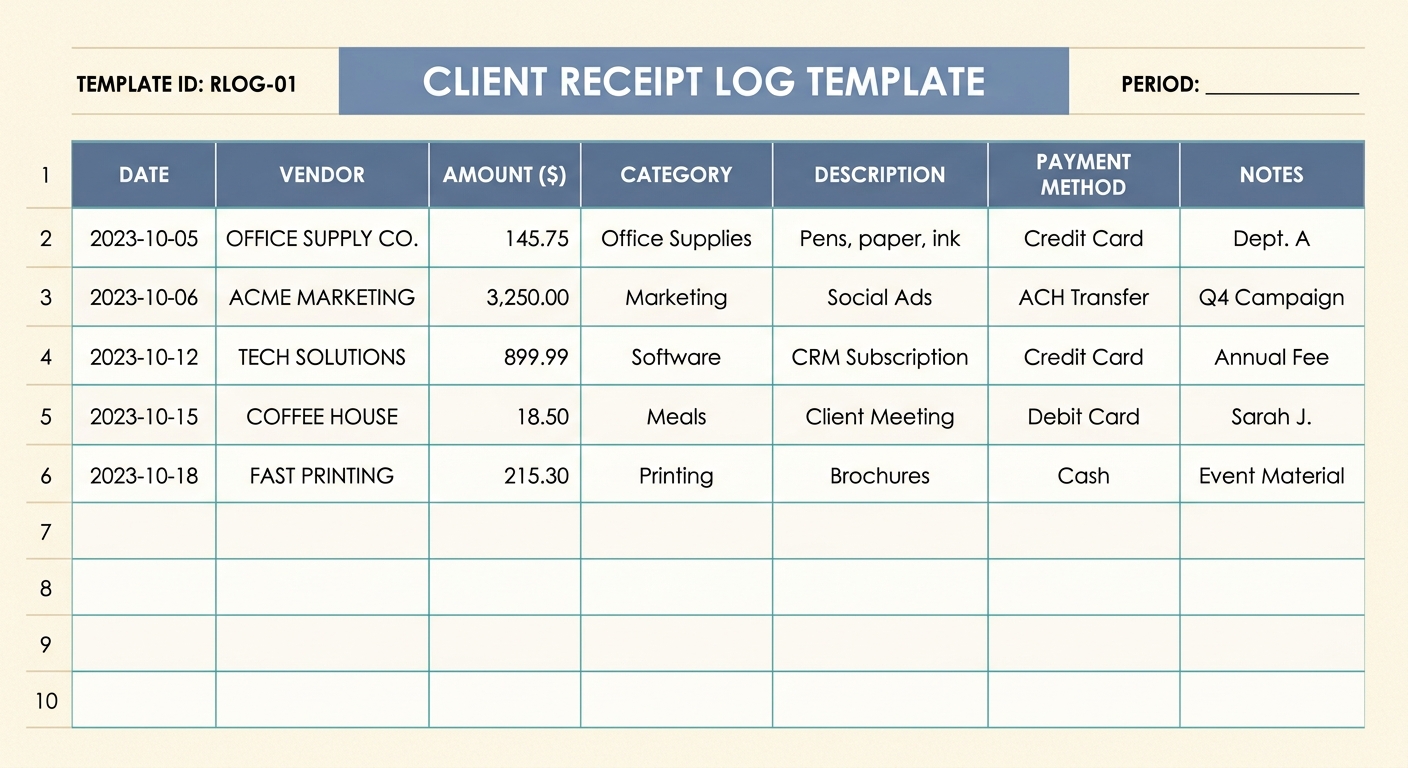
Client Receipt Log Template: Streamline Your Expense Tracking
In the dynamic world of business, managing finances effectively is paramount. For professionals, consultants, and service-based businesses, tracking client-related expenses is not just good practice; it is a necessity for accurate billing, tax compliance, and insightful financial analysis. A well-organized client receipt log template serves as your foundational tool in this endeavor. It transforms a chaotic pile of receipts into an orderly, actionable record, ensuring that every reimbursable expense is captured and allocated correctly. This article will guide you through creating and utilizing an efficient client receipt log, helping you to maintain pristine financial records with ease.
What is a Client Receipt Log Template and Why Do You Need One?
A client receipt log template is a structured document, typically a spreadsheet, designed to record all expenditures made on behalf of or directly related to a specific client or project. Think of it as a dedicated ledger for your client-specific outlays. Its primary purpose is to provide a clear, itemized account of every receipt, making it simple to track, bill, and reconcile expenses.
The need for such a template stems from several critical business requirements:
- Accurate Client Billing: Ensures you never miss billing a client for legitimate expenses, preventing revenue loss.
- Simplified Tax Preparation: Provides a clear audit trail for all deductible client-related costs, making tax season less stressful.
- Enhanced Financial Oversight: Offers a granular view of project costs, aiding in budgeting and profitability analysis.
- Improved Client Trust: Transparent expense tracking fosters confidence and strengthens client relationships.
- Compliance and Audit Readiness: Helps you maintain organized records that can withstand scrutiny from auditors or tax authorities.
Essential Fields for Your Client Receipt Log Template
A robust client receipt log template is defined by the data it captures. To ensure comprehensive tracking, your template should include specific, actionable columns. Here is a checklist of essential fields that form the backbone of an effective client receipt log:
- Client: This field identifies the specific client or project associated with the expense. It is crucial for proper allocation and billing.
- Date: The date the expense was incurred. Consistent date entry helps in chronological tracking and reconciliation.
- Service: A brief description of the service or purpose related to the expense. For example, "Meeting lunch," "Travel for client presentation," or "Software license for project X."
- Vendor: The name of the vendor or merchant from whom the goods or services were purchased. This could be a restaurant, airline, office supply store, or software provider.
- Amount: The total monetary value of the expense, including taxes. Ensure currency is clearly indicated if working with international clients.
- Billed to Client: A simple Yes/No or checkbox field indicating whether this expense has been, or will be, billed to the client. This is vital for tracking unbilled expenses.
- Notes: A flexible field for any additional pertinent information, such as specific details about the purchase, project codes, or reasons for the expense.
Populating these fields can be a time-consuming manual task, especially when dealing with numerous receipts. This is where tools like SlipSheet prove invaluable. SlipSheet streamlines this process by transforming receipt photos and email receipts directly into structured spreadsheet rows, ready to integrate seamlessly into your client receipt log template. It intelligently extracts key data points like vendor, date, and amount, significantly reducing manual data entry and potential errors.
How to Effectively Use Your Client Receipt Log Template
Implementing your client receipt log template effectively involves more than just filling in columns; it requires a systematic approach to ensure accuracy and consistency.
Here are key strategies for optimal use:
- Immediate Entry: The golden rule of receipt management is to record expenses as soon as they occur. Do not let receipts pile up. Whether it is a physical receipt or an email confirmation, capture the details promptly. Using SlipSheet, you can snap a photo of a physical receipt or forward an email receipt, and the data will be processed for you almost instantly.
- Consistency is Key: Establish a consistent method for categorizing services and vendors. This uniformity will make searching, filtering, and reporting much easier down the line.
- Regular Review and Reconciliation: Set aside dedicated time, perhaps weekly or bi-weekly, to review your log against your bank statements or credit card statements. This helps catch discrepancies and ensures all expenses are accounted for.
- Backup Your Data: Whether your log is a cloud-based spreadsheet or a local file, ensure it is regularly backed up. Data loss can be catastrophic for financial records.
- Integrate with Billing Software: If possible, use the data from your client receipt log to inform your invoicing process. This minimizes manual data transfer and errors when generating client bills. SlipSheet's output can be easily imported into most spreadsheet programs, making this integration straightforward.
Customizing Your Client Receipt Log Template for Specific Needs
While the core fields provide a solid foundation, every business is unique. Your client receipt log template should be flexible enough to adapt to your specific operational needs and industry requirements.
Consider these customization options:
- Adding Project Codes: If you manage multiple projects for a single client, adding a "Project Code" or "Task ID" field can provide finer granularity in expense allocation.
- Including Reimbursable Status: Beyond "Billed to Client," you might add a "Reimbursable Status" field with options like "Pending," "Approved," "Denied," or "Partially Reimbursed."
- Tracking Payment Method: A "Payment Method" column, detailing whether the expense was paid via credit card, debit card, cash, or company account, can be useful for internal reconciliation.
- Categorizing Expense Types: For more detailed financial analysis, you could add an "Expense Category" field, classifying expenses as "Travel," "Meals," "Software," "Supplies," etc.
- Client Approval Status: For high-value expenses, a field to track whether client approval was obtained prior to the expense can be beneficial.
The beauty of a spreadsheet-based template is its inherent adaptability. You can easily add or remove columns, apply conditional formatting, and create pivot tables to analyze your data in various ways, tailoring it precisely to your business intelligence requirements.
Client Receipt Log Template Variations for Different Business Types
The fundamental principles of a client receipt log remain consistent, but its application and specific fields might vary based on the business type.
- Freelancers and Independent Contractors: Often need a simplified log focusing on direct project costs. They might add fields for "Hourly Rate" or "Project Milestone" to tie expenses directly to deliverables.
- Consulting Firms: May require more detailed tracking for travel, accommodation, and per diem expenses. Fields like "Travel Dates," "Departure/Arrival Location," and "Per Diem Rate" could be essential.
- Marketing Agencies: Might track expenses related to specific campaigns, such as advertising spend, content creation tools, or event costs. Fields like "Campaign ID" or "Ad Platform" would be relevant.
- Construction and Contracting Companies: Could incorporate fields for "Job Site," "Material Type," "Subcontractor Name," and "Equipment Rental Hours" to manage project-specific material and labor costs.
- Law Firms: May need to track court fees, filing costs, research subscriptions, and expert witness fees, often requiring specific "Case ID" fields for each client matter.
Regardless of your industry, the core objective is to create a system that accurately reflects your financial transactions and supports your operational workflow.
An effective client receipt log template is an indispensable asset for any business that incurs expenses on behalf of its clients. It is more than just a record-keeping tool; it is a strategic instrument that drives accurate billing, simplifies tax preparation, and provides critical insights into your financial health. By consistently utilizing a well-designed template and leveraging modern tools like SlipSheet, you can transform the often-dreaded task of receipt management into a smooth, efficient process. Say goodbye to manual data entry headaches and lost receipts, and hello to organized, actionable financial data.
Ready to revolutionize your receipt management? Learn more about how SlipSheet can transform your receipt photos and email receipts into structured spreadsheet rows, perfectly aligning with your client receipt log template, at slipsheet.app.
FAQ
What is the primary purpose of a client receipt log template?
The primary purpose is to accurately track and categorize all expenses incurred on behalf of clients, ensuring correct billing, simplified tax preparation, and better financial oversight. It helps prevent lost revenue from unbilled expenses.
How often should I update my client receipt log?
It is best practice to update your client receipt log immediately as expenses occur, or at least on a daily or weekly basis. Consistent, timely entry prevents backlogs and ensures accuracy.
Can a client receipt log template be used for personal expenses?
While designed for business, the principles of a client receipt log can be adapted for personal expense tracking. However, it is generally recommended to keep business and personal finances separate for clarity and tax purposes.
What are the benefits of using a digital client receipt log over a paper one?
Digital logs offer numerous benefits, including easier search and filtering, automated calculations, secure cloud storage, and the ability to integrate with other financial tools. They are also more environmentally friendly and less prone to physical loss.
How does SlipSheet help with managing a client receipt log?
SlipSheet automates data entry by converting receipt photos and email receipts into structured spreadsheet rows. This significantly reduces manual effort, improves accuracy, and populates your log quickly with essential details like vendor, date, and amount.