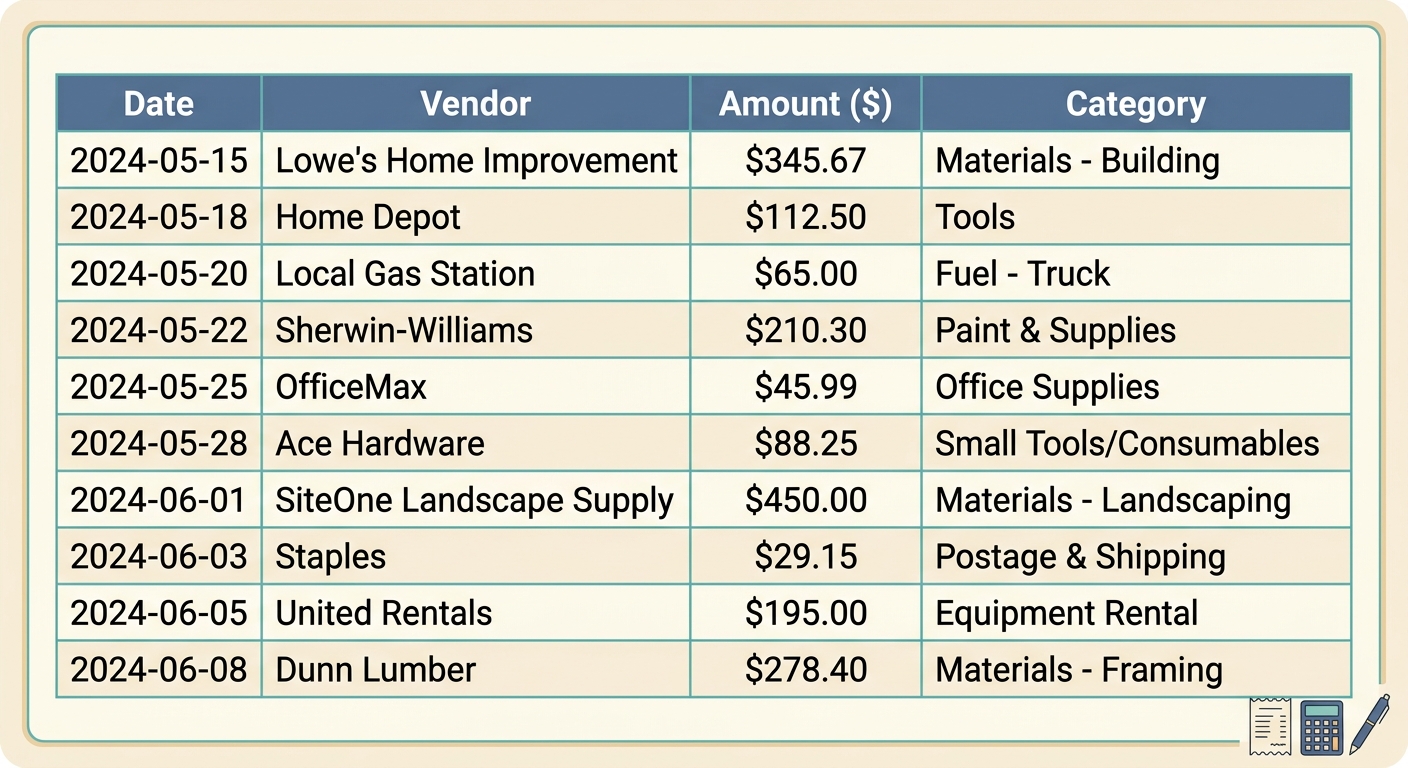
Streamline Your Finances: The Essential Contractor Expense Report Template Guide
As a contractor, managing your finances efficiently is paramount to your success. From materials and tools to travel and administrative costs, expenses can quickly accumulate across multiple projects. Without a robust system in place, tracking these expenditures can become a chaotic and time-consuming task, leading to missed deductions, reimbursement delays, and a muddled financial picture. This is where a well-structured contractor expense report template becomes an invaluable asset, providing clarity, organization, and peace of mind.
A dedicated template not only simplifies the process of recording every dollar spent but also ensures that you have all the necessary documentation for accounting, tax purposes, and client billing. It’s more than just a spreadsheet; it's a critical tool for maintaining financial health and demonstrating professionalism. Let's delve into what makes an effective contractor expense report template and how you can leverage it to your advantage.
What is a Contractor Expense Report Template?
At its core, a contractor expense report template is a standardized document, often a spreadsheet, designed to record and categorize all business-related expenditures incurred by a contractor. Its primary purpose is to provide a clear, itemized breakdown of costs, making it easier to track spending, prepare for tax season, justify reimbursements, and gain insight into project profitability.
For independent contractors, freelancers, and small contracting firms, this template serves multiple vital functions. It acts as a personal accountant, ensuring no expense goes unnoticed. It's a compliance tool, providing the necessary documentation for audits and tax filings. Furthermore, it's a strategic resource, offering data that can inform future budgeting and pricing decisions. Instead of sifting through stacks of physical receipts, a digital template offers an organized, searchable database of your financial activity.
Key Fields and Columns in Your Template
An effective contractor expense report template includes specific fields that capture all relevant details for each transaction. While customization is always an option, certain columns are universally essential for comprehensive tracking. Here is a checklist of critical fields you should include:
- Date: The exact date the expense occurred. This is crucial for chronological record-keeping and matching with bank statements or credit card transactions.
- Contractor: If your firm employs multiple contractors, this field identifies who incurred the expense. For solo contractors, it can simply state your name or be omitted.
- Project: Assigning each expense to a specific project is vital for project costing, client billing, and assessing project profitability.
- Expense type: Categorize the expense (e.g., materials, tools, fuel, travel, meals, software, subcontractor fees). Proper categorization simplifies tax preparation and financial analysis.
- Amount: The total monetary value of the expense. This should be clearly stated and accurate.
- Receipt attached: A binary indicator (Yes/No) confirming that a receipt or proof of purchase is available. This is non-negotiable for audit purposes and often for reimbursement. Tools like SlipSheet make attaching digital receipts effortless, transforming photos and email receipts into spreadsheet-ready data.
- Approved: An internal field, particularly useful for firms, indicating whether the expense has been reviewed and approved for reimbursement or accounting.
Consider adding other useful fields such as 'Vendor/Merchant', 'Payment Method', 'Description/Notes', and 'Reimbursable (Yes/No)' to further enhance the detail and utility of your report.
How to Effectively Use Your Contractor Expense Report Template
Having a template is only the first step; consistent and accurate usage is key to unlocking its full potential. Follow these best practices to ensure your expense reporting is efficient and effective:
- Record Expenses Promptly: Do not let expenses pile up. Enter them into your template as soon as they occur. This prevents forgotten details and lost receipts, ensuring accuracy.
- Attach Receipts Diligently: Every expense should ideally have a corresponding receipt. Use a system to digitize and link these receipts. SlipSheet excels here, allowing you to simply snap a photo of a paper receipt or forward an email receipt, and it automatically extracts the data, ready for your spreadsheet. This eliminates manual data entry and keeps your digital records organized.
- Categorize Correctly: Be consistent with your expense types. A clear, standardized list of categories will make reporting and analysis much easier down the line.
- Regular Review and Reconciliation: Set aside time weekly or monthly to review your expenses against your bank statements or credit card activity. This helps catch discrepancies and ensures all transactions are accounted for.
- Maintain a Consistent Workflow: Establish a routine for collecting receipts, entering data, and reviewing your report. Consistency is the backbone of accurate financial tracking.
By adhering to these practices, you will not only maintain impeccable financial records but also gain valuable insights into your spending habits and project costs.
Customizing Your Template for Specific Needs
While the core fields provide a solid foundation, the true power of a template lies in its adaptability. Contractors operate in diverse fields, and their specific needs will vary. Customizing your expense report template ensures it perfectly aligns with your business model.
Consider adding columns relevant to your industry. For example, a construction contractor might add fields for 'Equipment Rental Hours', 'Permit Fees', or 'Subcontractor Name'. An IT consultant might include 'Software License Costs' or 'Client Entertainment'. You could also incorporate budgeting columns to compare actual spending against planned expenditures, offering immediate feedback on project financial health.
The flexibility extends to how you manage the data. If you use accounting software, ensure your template's structure allows for easy import or integration. Most spreadsheet programs can export data in CSV format, which is widely compatible. With tools like SlipSheet, the extracted data from your receipts can be exported directly into a format that seamlessly fits into your customized template, saving significant manual input time.
Common Variations for Different Business Types
The fundamental principles of expense reporting remain constant, but the emphasis and specific fields can shift based on the contractor's business structure and industry:
- Sole Proprietors and Freelancers: Often require simpler templates, focusing heavily on tax-deductible expenses. Fields like 'Project' might be less critical if they work on a single, ongoing project, but 'Client' could be highly relevant.
- Small Contracting Firms: These businesses typically need more robust templates that track expenses across multiple contractors and projects. Reimbursement status and approval workflows become more important.
- Specialized Contractors (e.g., HVAC, Electricians, Plumbers): Their templates might feature detailed sections for material costs, specific tool purchases, vehicle maintenance, and mileage tracking, which are significant operational expenses.
- Consultants: Travel, lodging, client entertainment, professional development, and specific software subscriptions often dominate their expense reports. Fields for per diems or specific travel dates might be added.
Regardless of your niche, the goal remains the same: to create a clear, accurate, and easily manageable record of all business expenditures. Start with the core template, then iteratively refine it to suit your unique operational demands, always keeping tax implications and financial analysis in mind.
Conclusion
A well-designed and consistently used contractor expense report template is an indispensable tool for any contractor aiming for financial clarity and operational efficiency. It simplifies tax preparation, streamlines client billing, and provides critical insights into your business's financial health. By embracing systematic expense tracking, you can transform a potentially daunting task into a straightforward process, allowing you to focus more on your craft and less on administrative burdens.
For an even smoother process, consider integrating a tool like SlipSheet. It effortlessly transforms your receipt photos and email receipts directly into spreadsheet rows, making data entry for your contractor expense report template virtually automatic. Visit slipsheet.app today to simplify your expense management and take control of your financial records.
FAQ
Why do contractors need an expense report template?
Contractors need an expense report template to accurately track income and outgoing costs, facilitate tax deductions, and maintain clear financial records for their business. It helps streamline financial management and ensures proper documentation for all expenditures.
What are the most important fields in a contractor expense report?
Essential fields include Date, Project, Expense Type, Amount, and a clear indication of whether a Receipt is attached. These ensure comprehensive tracking and provide necessary details for financial reconciliation.
How often should I update my expense report?
It is best practice to update your expense report weekly, or at minimum, monthly. Regular updates prevent backlog, ensure accuracy, and make the process less daunting.
Can a contractor expense report template help with tax season?
Absolutely. A well-maintained template provides a clear, categorized record of all business expenses, making tax preparation significantly easier and helping you identify all eligible deductions.
How can I easily manage receipts for my expense report?
Tools like SlipSheet are designed for this purpose, allowing you to quickly convert receipt photos and email receipts into structured data for your spreadsheet. This eliminates manual data entry and keeps your records organized.