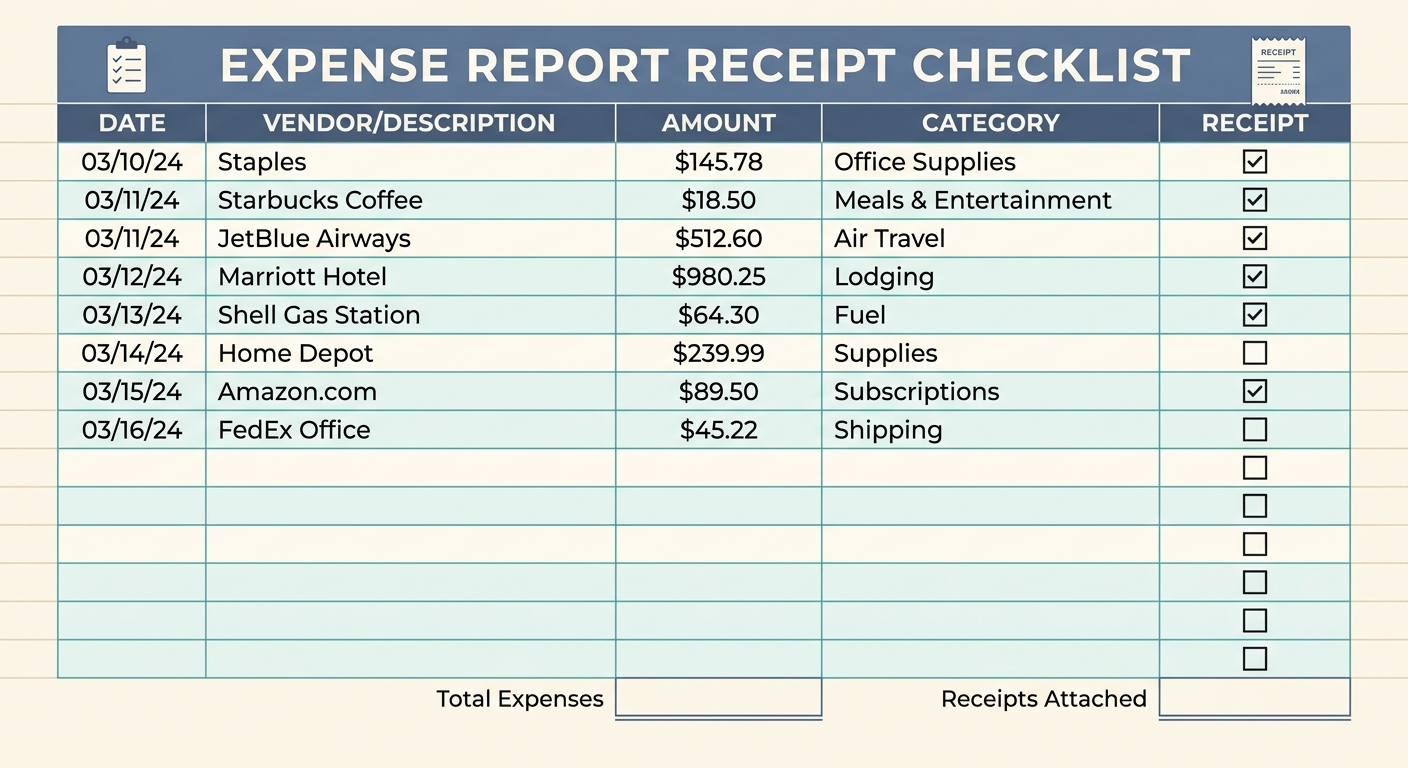
Expense Report Receipt Checklist: Your Ultimate Guide to Painless Reimbursements
Navigating the often-complex world of expense reports can feel like a daunting task. For many professionals, the mere thought of gathering, organizing, and submitting receipts is enough to induce a sigh of resignation. Missing details, illegible scans, or forgotten purposes can lead to rejected claims, delayed reimbursements, and unnecessary frustration for both employees and finance departments. This is where an effective expense report receipt checklist becomes indispensable, transforming a chaotic chore into a streamlined process.
A well-defined checklist ensures that every piece of essential information is captured, verified, and ready for submission, minimizing errors and accelerating approval times. It acts as a universal standard, guiding you through each receipt with precision. Imagine a world where every receipt is perfectly prepared, every expense easily categorized, and every reimbursement request sails through without a hitch. With the right checklist, coupled with smart tools like SlipSheet, this ideal scenario is well within reach.
What is an Expense Report Receipt Checklist and Why Do You Need One?
An expense report receipt checklist is a structured list of critical data points and requirements that must be present or verifiable for each receipt submitted for reimbursement. It serves as a quality control mechanism, ensuring compliance with company policies, tax regulations, and accounting standards. Its primary purpose is to standardize the receipt submission process, making it transparent and efficient.
The benefits of adopting such a checklist are manifold. Firstly, it significantly reduces the likelihood of errors and omissions, which are common culprits behind rejected expense reports. Secondly, it saves valuable time for employees, who no longer need to second-guess what information is required, and for finance teams, who can process claims much faster. Thirdly, it fosters greater transparency and accountability, providing a clear audit trail for every expense. Finally, a robust checklist, especially when integrated with automated solutions, enhances overall financial accuracy and compliance, protecting both the individual and the organization from potential issues.
Key Fields and Columns for Your Essential Receipt Checklist
To create a truly effective expense report receipt checklist, you must identify the core pieces of information that are universally required for proper expense tracking and reimbursement. Here are the fundamental fields that should be on every checklist, ensuring you capture all necessary data from the outset:
- Receipt Image or PDF: This is the foundation of your claim. A clear, legible digital copy, whether a photo or a scanned PDF, is crucial. It serves as undeniable proof of purchase. Tools like SlipSheet excel at converting these raw images or email attachments into structured data, making the subsequent steps much easier.
- Purchase Date: The exact date of the transaction is vital for accounting purposes, ensuring expenses are recorded in the correct period and adhere to any time-sensitive policies.
- Vendor: Clearly identify who the payment was made to. This helps categorize expenses, verify legitimate businesses, and prevent duplicate entries.
- Business Purpose: This is perhaps one of the most frequently overlooked yet critical pieces of information. A concise explanation of why the expense was incurred, directly linking it to business activities, is essential for IRS compliance and internal auditing. For example, 'Client dinner to discuss Q3 strategy' is far more effective than just 'Dinner'.
- Project or Client (if applicable): For project-based businesses or consultants, assigning an expense to a specific project or client is crucial for accurate cost allocation, billing, and profitability analysis.
- Total Amount: The exact monetary value of the transaction, including all taxes and tips. This figure must match the receipt precisely.
- Reimbursement Status: While not always directly on the receipt itself, tracking whether an expense has been submitted, approved, or reimbursed is a critical internal checklist item for the employee and finance department.
By diligently checking off each of these items for every receipt, you build a comprehensive and unimpeachable record of your business expenditures.
How to Effectively Use Your Expense Report Receipt Checklist
Having a checklist is one thing, but knowing how to integrate it seamlessly into your daily routine is another. Effective utilization ensures maximum benefits. Here is a practical approach to using your expense report receipt checklist:
- Capture Immediately: The moment you receive a physical receipt, take a clear photo of it. For email receipts, save them promptly. Procrastination is the enemy of accurate expense reporting. This immediate capture is where tools like SlipSheet shine, allowing you to snap a picture or forward an email and instantly begin the data extraction process.
- Review Against the Checklist: As soon as you have the digital receipt, or even better, as the data is extracted by a tool like SlipSheet, compare the available information against your checklist. Does it have the vendor, date, total, and is the business purpose clear?
- Add Missing Information: If any details, particularly the business purpose or project code, are not explicitly on the receipt, add them immediately. Many expense management systems, including the spreadsheets SlipSheet creates, allow for additional notes or fields.
- Organize and Store: Store your digital receipts and their associated data in a structured manner. SlipSheet automatically organizes your receipt data into spreadsheet rows, making it incredibly easy to manage, sort, and verify against your checklist items. This eliminates manual data entry and ensures consistency.
- Submit Promptly: Once you have a batch of fully compliant receipts, submit them according to your company's schedule. Prompt submission prevents forgotten expenses and ensures timely reimbursement.
By embedding this checklist discipline into your workflow, especially with the aid of intelligent automation, you transform expense reporting from a reactive scramble into a proactive, orderly process.
Customizing Your Checklist for Specific Needs
While the core checklist items are universally important, the beauty of an expense report receipt checklist lies in its adaptability. You can, and often should, customize it to align with your organization's unique policies, industry regulations, or specific project requirements. Customization ensures that your checklist remains highly relevant and maximally effective.
Consider adding fields such as:
- Department Code: For larger organizations, assigning expenses to specific departments helps with internal budgeting and cost analysis.
- Payment Method: Tracking whether an expense was paid by company card, personal card, or cash can be crucial for reconciliation.
- Attendees (for Meals/Entertainment): For expenses involving clients or colleagues, listing attendees and their affiliations is often required for compliance and justification.
- Mileage Details: If travel is a significant part of your role, a dedicated section for mileage, including start/end locations, dates, and purpose, is essential.
- Approval Workflow Status: Beyond basic reimbursement status, you might track specific stages of internal approval.
The key is to strike a balance: include enough detail to ensure compliance and accuracy, but avoid over-complicating it to the point of being cumbersome. Regularly review your customized checklist with your finance team to ensure it remains current and effective.
Common Variations: Tailoring the Checklist for Different Business Types
The ideal expense report receipt checklist can vary significantly depending on the nature of the business. Different industries and organizational structures have unique reporting requirements and expense patterns. Here are a few examples of how the checklist might be tailored:
- Small Businesses: Often require a simpler checklist, focusing on core elements like date, vendor, total, and a brief business purpose. The emphasis is on ease of use and basic tax compliance.
- Consulting Firms: For these businesses, the 'Project or Client' field becomes paramount for accurate client billing and project profitability. Detailed tracking of hours, travel, and client entertainment expenses is also common.
- Sales Teams: A sales-focused checklist might prioritize fields for 'Client Name', 'Meeting Purpose', and 'Attendees' for entertainment or travel expenses, ensuring compliance with anti-bribery policies and effective client relationship management.
- Non-Profits: Often require meticulous tracking of expenses against specific grants or funding sources. The checklist might include fields for 'Grant ID', 'Program Area', and detailed justification to meet donor reporting requirements.
- Construction or Field Service Companies: May need to add fields for 'Job Site Location', 'Equipment Used', or 'Material Purchases' to allocate costs accurately to specific projects or contracts.
Understanding these variations allows businesses to implement a checklist that is not only comprehensive but also perfectly aligned with their operational realities and regulatory obligations. Regardless of your business type, the goal remains the same: to create a clear, auditable, and efficient system for managing receipts.
Implementing a robust expense report receipt checklist is not merely about compliance; it is about efficiency, accuracy, and peace of mind. By consistently applying these principles, you transform a potentially stressful administrative task into a smooth, predictable process. This ensures timely reimbursements, accurate financial records, and a happier workforce.
Ready to simplify your expense reporting? Visit slipsheet.app to learn how SlipSheet can transform your receipt management from a tedious chore into a seamless, automated process, turning your receipt photos and email receipts into perfectly organized spreadsheet rows.
FAQ
What is the primary benefit of an expense report receipt checklist?
The primary benefit is ensuring all necessary information is captured for each expense, which reduces errors, speeds up reimbursements, and maintains compliance with company policies and tax regulations.
How does SlipSheet help with this checklist?
SlipSheet automates the process by converting receipt photos and email receipts into structured spreadsheet data, making it much easier to verify and organize all checklist items without manual data entry.
What information is most crucial to include on every receipt?
The most crucial information includes the receipt image or PDF, purchase date, vendor, total amount, and a clear business purpose for the expense.
Can I customize my expense report receipt checklist?
Yes, checklists should be customized to fit your organization's specific policies, industry regulations, and unique reporting needs, potentially adding fields like department codes or project IDs.
Why is a business purpose important for each expense?
A business purpose is critical for justifying the expense, ensuring it aligns with company operations, and meeting IRS requirements for tax deductibility and audit trails.