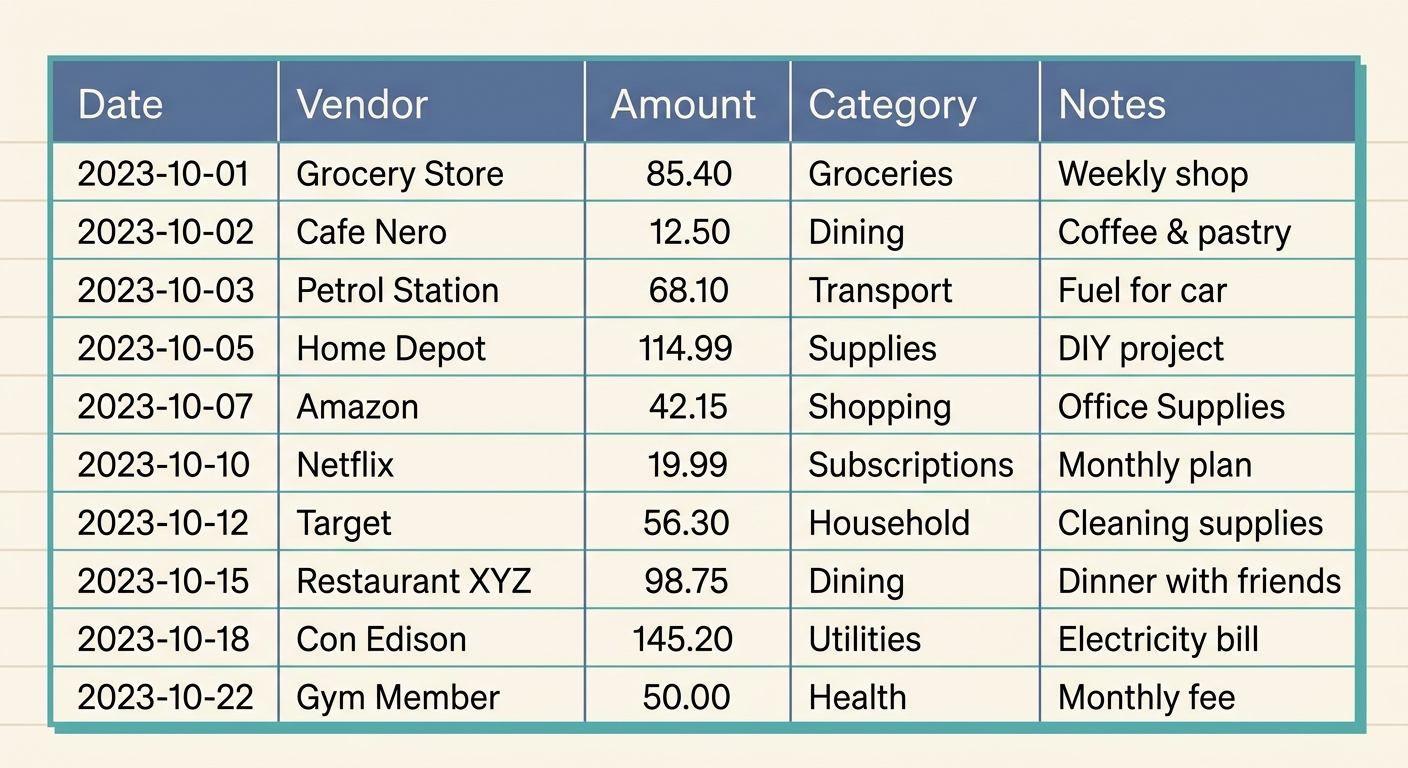
Managing finances, whether for personal budgeting, freelance work, or a growing small business, often feels like navigating a labyrinth of receipts, invoices, and bank statements. The sheer volume of transactions can make it challenging to understand where your money is truly going. This is precisely why a well-structured monthly expense summary template is not just a useful tool, but an essential one for financial clarity and strategic planning. It transforms chaos into order, providing a panoramic view of your financial health each month.
A monthly expense summary template serves as your personal or business financial compass, guiding you through spending habits, identifying areas for potential savings, and ensuring you stay within your budgetary goals. It is the backbone of effective financial management, allowing you to track, analyze, and make informed decisions. Forget the days of scrambling at tax time or wondering why your bank balance is lower than expected; with a systematic approach to expense tracking, you gain control and confidence over your money.
What is a Monthly Expense Summary Template?
At its core, a monthly expense summary template is a structured document, often a spreadsheet, designed to record and categorize all financial outflows over a 30-day period. It acts as a centralized ledger for every penny spent, providing a clear, itemized breakdown of expenditures. The primary purpose is to offer a snapshot of your financial activity, enabling you to compare actual spending against planned budgets and understand the overall flow of your funds.
For individuals, it might mean tracking groceries, utilities, entertainment, and transportation. For freelancers, it extends to project-related costs, software subscriptions, and professional development. Small businesses utilize it to monitor operational expenses, marketing spend, payroll, and supplier payments. Regardless of the user, the goal remains consistent: to bring transparency to spending, facilitate budgeting, and support sound financial decision-making. It is a proactive tool that helps prevent financial surprises and promotes long-term fiscal responsibility.
Essential Fields and Columns for Your Template
To be truly effective, a monthly expense summary template needs specific fields that capture all relevant information. These columns are the building blocks of your financial overview, ensuring you have a comprehensive picture of your spending. Here are the crucial elements:
- Month: This fundamental field clearly indicates the period the expenses pertain to, allowing for easy historical comparison and trend analysis.
- Category: Perhaps the most vital column, this groups similar expenses together. Common categories include utilities, rent, groceries, marketing, office supplies, travel, and payroll. Well-defined categories are key to understanding where the bulk of your money is going.
- Budget: This column reflects the amount you *planned* to spend in each category for the month. It sets your financial targets and acts as a benchmark for performance.
- Actual: This is where you record the *real* amount spent in each category. It is the factual data collected from your transactions.
- Variance: Calculated as 'Budget - Actual', this field immediately highlights whether you overspent or underspent in a particular category. A negative variance indicates overspending, while a positive one means you stayed under budget, or even saved money.
- Top Vendors: Listing your primary vendors or merchants for each category can offer insights into where your money is flowing. For example, knowing your top three suppliers for office supplies can inform future purchasing decisions.
- Notes: A flexible field for any additional information, such as specific reasons for an expense, project codes, or details about an unusual transaction. This context can be invaluable when reviewing your summary later.
How to Effectively Use Your Monthly Expense Summary Template
Implementing your monthly expense summary template effectively involves a consistent process. It is not enough to just have the template; regular and accurate data entry is paramount.
- Data Collection: The first step is gathering all your expense data. This includes physical receipts, email receipts, bank statements, and credit card statements. This can often be the most time-consuming part. Fortunately, tools like SlipSheet can drastically simplify this. SlipSheet transforms receipt photos and email receipts into structured spreadsheet rows, ready for direct input into your template, saving hours of manual data entry.
- Categorization and Entry: Once collected, categorize each expense according to your template's definitions. Enter the date, amount, category, and any relevant notes into the 'Actual' column. For recurring expenses, you might pre-fill some entries.
- Regular Review: Do not wait until the end of the month to review. Check in weekly or bi-weekly to see how you are tracking against your budget. This allows for mid-month adjustments if you notice you are overspending in certain areas.
- Calculate Variance: At the end of the month, sum up your 'Actual' spending for each category and calculate the 'Variance'. This provides immediate feedback on your financial performance.
- Analyze and Adjust: Review the 'Variance' column closely. Are there consistent overspends in certain categories? Can you identify areas for cost reduction? Use these insights to refine your budget for the following month and make more informed financial decisions.
Customizing Your Template for Specific Needs
While the core fields are essential, the beauty of a monthly expense summary template lies in its adaptability. You are not confined to a rigid structure; customization is key to making it truly work for you or your business.
You might add fields like 'Payment Method' to track spending across different cards or accounts, or 'Project Code' for freelancers and agencies needing to allocate expenses to specific client projects. Small businesses might benefit from adding 'Department' to track spending by different teams. Conversely, if certain fields are irrelevant to your situation, do not hesitate to remove them to reduce clutter and simplify your template. Refining your categorization scheme is also a powerful customization. Instead of just 'Travel,' you might break it down into 'Flights,' 'Accommodation,' and 'Per Diem' for more granular insights. Integrating your template with other financial tools or accounting software can also enhance its utility, creating a more cohesive financial management ecosystem.
Monthly Expense Summary Template Variations for Different Business Types
The generic monthly expense summary template provides a solid foundation, but specific business models often require tailored versions to address their unique financial landscapes:
- For Freelancers and Consultants: Your template might include columns for 'Client/Project Name,' 'Billable vs. Non-Billable,' and 'Reimbursable Expenses.' This helps in accurately invoicing clients and tracking profitability per project. Categories like 'Software Subscriptions,' 'Professional Development,' and 'Home Office Expenses' become more prominent.
- For Small Retail Businesses: Beyond standard operating costs, you would likely need dedicated sections for 'Cost of Goods Sold (COGS),' 'Inventory Purchases,' 'Shipping & Handling,' and 'Point-of-Sale (POS) Fees.' Tracking 'Sales Revenue' alongside expenses also provides a clearer profit margin analysis.
- For Service-Based Businesses: Focus on labor costs with fields for 'Employee Salaries,' 'Contractor Fees,' and 'Benefits.' Categories like 'Client Acquisition Costs,' 'Marketing Campaigns,' and 'Customer Support Tools' would be highly relevant.
- For Non-Profit Organizations: Your template would emphasize 'Grant-Specific Expenses,' 'Program Costs,' 'Fundraising Expenses,' and 'Administrative Overhead.' Transparency and accountability are paramount, so detailed notes and clear categorization linked to funding sources are crucial.
By adapting the template to these specific needs, businesses can gain even deeper insights into their financial performance and allocate resources more effectively.
Embracing a monthly expense summary template is a pivotal step towards achieving greater financial control and insight. It transforms the daunting task of expense tracking into a manageable, analytical process. While manual data entry can be a hurdle, remember that innovative solutions exist to streamline this process. SlipSheet, for instance, is specifically designed to convert your receipt photos and email receipts into organized spreadsheet rows, making populating your template effortless. Take the guesswork out of your finances and empower your decision-making with clear, accurate data. Start building your financial future today by simplifying your expense management. Visit slipsheet.app to learn how SlipSheet can help you achieve this with ease.
FAQ
What is the primary benefit of using a monthly expense summary template?
It provides a clear overview of your spending, helps identify areas for savings, and supports informed financial decisions for better money management.
How often should I update my monthly expense summary template?
Ideally, update it weekly or bi-weekly to keep data current, prevent a large backlog at month-end, and allow for timely budget adjustments.
Can a monthly expense summary template help with tax preparation?
Yes, by meticulously tracking and categorizing expenses, it creates a detailed record that simplifies tax filing and ensures you claim all eligible deductions efficiently.
Is there an easy way to get data from receipts into the template?
Tools like SlipSheet significantly simplify this process by converting receipt photos and email receipts directly into spreadsheet rows, ready for your template, saving manual effort.
What's the difference between "Budget" and "Actual" in the template?
"Budget" is your planned spending for a category, while "Actual" is the real amount you spent, allowing you to quickly see your financial performance against your goals.