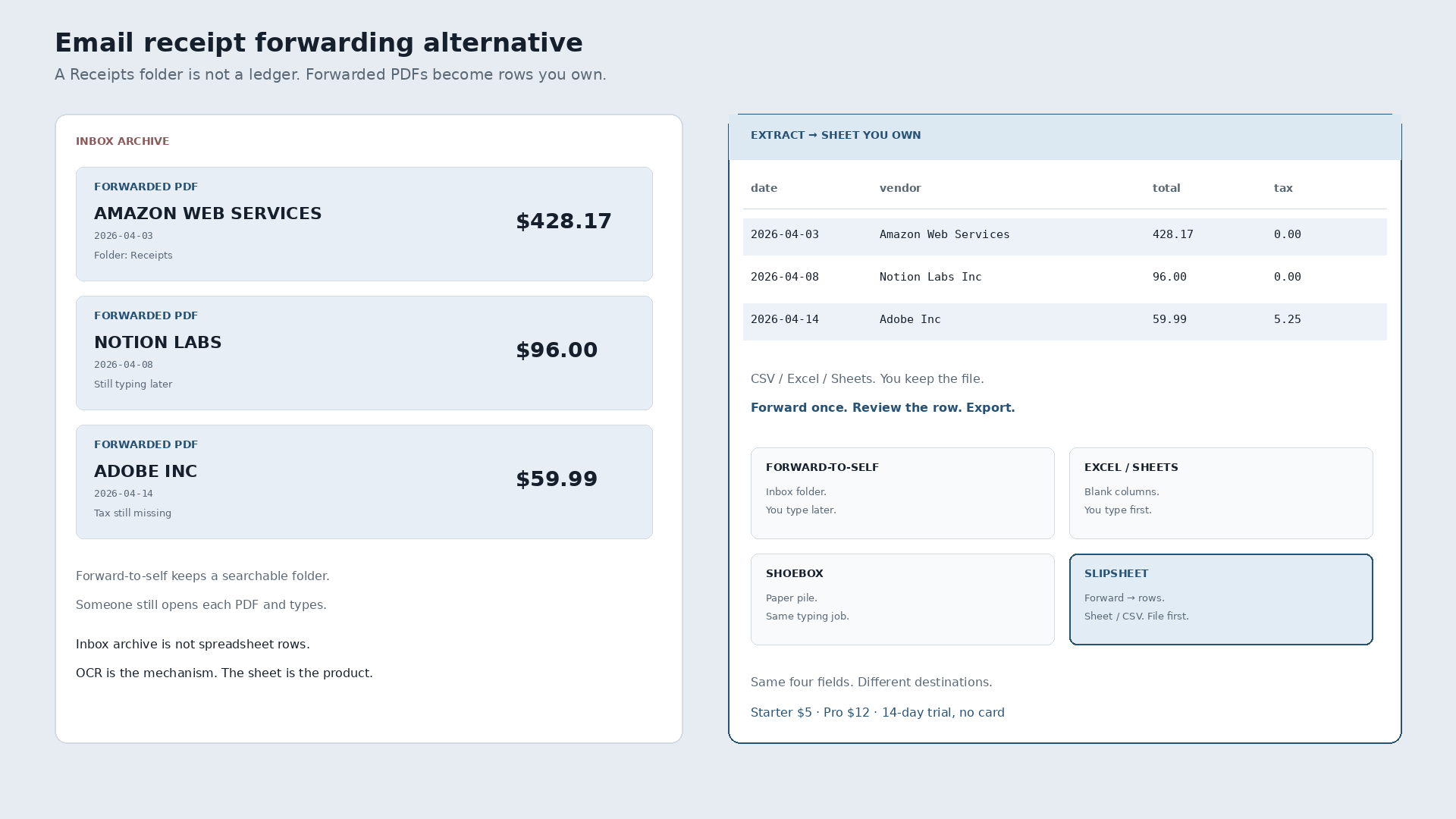
In the world of expense tracking, managing receipts can feel like an endless chore. Many individuals and small businesses resort to a straightforward method: email forwarding. While seemingly simple, this approach often creates more work than it saves. If you are searching for an email receipt forwarding alternative that genuinely streamlines your financial record-keeping, it is time to explore more specialized solutions like SlipSheet.
This article will delve into the common practice of email forwarding for receipts, highlighting its benefits and, more importantly, its significant drawbacks. We will then introduce SlipSheet as a powerful, focused alternative designed to transform your receipt management from a manual headache into an automated, efficient process, directly populating your spreadsheets with accurate data.
What email forwarding does well for receipts
Email forwarding, at its core, is a simple and accessible tool. For receipts, its primary advantage lies in its universality and ease of use. Almost everyone knows how to forward an email, making it a go-to for quick archiving or sharing. When you receive an email receipt, forwarding it to a dedicated inbox, whether personal or for a bookkeeper, serves as a basic digital filing system. It keeps a record of the transaction in one place, preventing physical clutter and providing a searchable history within your email client.
This method requires no special software or setup; it is an inherent function of email. For individuals with very few receipts, or those who merely need to send a receipt to another person for review, it can appear sufficient. It offers a rudimentary form of centralization, bringing various receipts into a single email thread or folder, which can be useful for occasional reference. However, this simplicity often masks a deeper inefficiency when it comes to actual data utilization.
Where email forwarding falls short for receipt management
While convenient for simple archiving, relying solely on email forwarding for receipt management quickly reveals its limitations, particularly for anyone needing to extract and utilize data. The most significant shortfall is the persistent need for manual data entry. Forwarding an email receipt to an inbox does not magically convert it into structured data. Someone still has to open each email, locate the relevant information, and then painstakingly type it into a spreadsheet or accounting system.
This manual process is incredibly time-consuming, repetitive, and highly susceptible to human error. Details like vendor name, date, amount, and category can easily be miskeyed or overlooked, leading to inaccuracies in financial records. Furthermore, email receipts come in various formats, making consistent data extraction a challenge. Some are plain text, others are image-based, and many are complex HTML, requiring careful parsing to find the necessary figures.
The lack of structure inherent in email also means that searching for specific data points across many receipts can be cumbersome, relying heavily on keyword searches that may not always yield precise results. As the volume of receipts grows, this manual workflow becomes unsustainable, consuming valuable time that could be spent on more productive tasks. It essentially shifts the problem from physical paper to digital clutter, without solving the fundamental issue of data extraction and organization.
What SlipSheet does differently as an email receipt forwarding alternative
SlipSheet stands out as a superior email receipt forwarding alternative because it goes beyond simple archiving; it automates the critical step of data extraction. Instead of forwarding your receipts to a generic inbox for manual processing, you send them directly to your unique SlipSheet email address. This key difference transforms the entire workflow.
Once a receipt, whether an email receipt or a photo of a physical receipt, arrives at SlipSheet, our intelligent system takes over. It employs advanced optical character recognition (OCR) and machine learning to identify and extract key pieces of information: vendor, date, total amount, currency, and even line items when available. This data is then structured and organized, ready for immediate use.
The primary output of SlipSheet is a clean, organized spreadsheet. This means no more opening individual emails, no more tedious typing, and significantly fewer errors. SlipSheet offers a focused solution for getting your receipt data into a format that is instantly usable for budgeting, expense reports, tax preparation, or integration with other financial tools. It respects your time by eliminating repetitive tasks, allowing you to focus on analyzing your finances rather than just inputting them.
Unlike broad email systems, SlipSheet is purpose-built for receipts, ensuring high accuracy and consistent data capture across diverse receipt formats. It provides a reliable bridge between your incoming receipts and your financial spreadsheets, making it an indispensable tool for efficient expense management.
Who should consider this email receipt forwarding alternative
The move to a specialized tool like SlipSheet is particularly beneficial for a wide range of individuals and small entities who are currently bogged down by manual receipt management. If you are a freelancer, a small business owner, an independent contractor, or anyone who regularly deals with a moderate to high volume of receipts, SlipSheet offers a clear advantage.
Consider SlipSheet if you find yourself:
- Spending hours each week or month manually typing receipt details into spreadsheets.
- Struggling with errors and inconsistencies in your expense records due to manual data entry.
- Feeling overwhelmed by a growing pile of physical receipts or a cluttered email inbox full of digital ones.
- Needing a simple, accurate, and exportable record of your expenses, without the complexity or cost of a full-fledged accounting suite.
- Wanting to reclaim valuable time that is currently wasted on repetitive administrative tasks.
SlipSheet is ideal for those who prioritize accuracy and efficiency in their expense tracking but prefer the flexibility and control of spreadsheet-based financial management. It provides a powerful automation layer without forcing you into a rigid, all-encompassing accounting ecosystem. If your goal is to get clean, structured receipt data into a spreadsheet with minimal effort, then SlipSheet is the email receipt forwarding alternative you have been looking for.
Common migration questions for your receipt workflow
Transitioning to a new system, even one designed for simplicity, often raises questions. Here are answers to some common concerns about adopting SlipSheet as your preferred receipt management solution:
How easy is it to switch from my current email forwarding method?
Switching to SlipSheet is remarkably simple. Instead of forwarding receipts to your personal or general accounting email, you simply forward them to your unique SlipSheet email address. For physical receipts, you just take a photo and send it to the same address. The setup is minimal, and you can begin processing receipts immediately.
What about past receipts that I have already forwarded or archived?
SlipSheet is designed to streamline your ongoing receipt management. For historical receipts, if they are still in email format, you can forward them to your SlipSheet address for processing. If they are physical receipts, you can easily snap photos and send them in. While SlipSheet excels at handling new incoming receipts, it also provides a straightforward way to digitize and extract data from your existing backlog.
Is my financial data secure with SlipSheet?
Yes, data security is a top priority for SlipSheet. We employ industry-standard security measures to protect your information, ensuring that your sensitive financial data is handled with care and stored securely. Your receipts and the extracted data are kept confidential and are only accessible by you.
What specific data points does SlipSheet extract from my receipts?
SlipSheet is designed to extract all essential details from your receipts. This typically includes the vendor name, date of purchase, total amount, currency, and often a description of items purchased. Our goal is to provide you with a comprehensive and actionable dataset for your financial records.
How do I access the extracted data from SlipSheet?
Accessing your data from SlipSheet is straightforward. Once your receipts are processed, you can easily view and download your extracted data as a CSV file or directly export it to popular spreadsheet applications like Google Sheets. This flexibility ensures that you can integrate your receipt data seamlessly into your existing financial workflows.
Ready to transform your receipt management from a chore into a seamless process? Discover the power of SlipSheet and say goodbye to manual data entry. Visit slipsheet.app today to learn more and get started.
FAQ
What is SlipSheet?
SlipSheet is a specialized tool that automatically extracts key data from receipt photos and email receipts, transforming them into structured rows in a spreadsheet. It simplifies expense tracking by eliminating manual data entry.
How does SlipSheet differ from just forwarding receipts to myself?
While forwarding receipts to yourself only archives them, SlipSheet processes these receipts, intelligently extracting vendor names, dates, amounts, and other details, then organizes this data into a usable spreadsheet format, saving you significant manual effort.
Can SlipSheet handle both photo receipts and email receipts?
Yes, SlipSheet is designed to expertly process both physical receipts, which you can send as photos, and digital email receipts, providing a comprehensive solution for all your expense documentation.
What kind of data does SlipSheet extract?
SlipSheet extracts essential information such as the vendor name, date of purchase, total amount, currency, and often line-item details, providing a robust dataset for your financial records.
Is SlipSheet suitable for small businesses and freelancers?
Absolutely, SlipSheet is ideal for small business owners, freelancers, and independent contractors who need an efficient, accurate, and straightforward way to manage expenses without the complexity of a full accounting suite.