How to Digitize Paper Receipts for Effortless Expense Tracking
In today's fast-paced digital world, paper receipts can feel like an archaic burden. They pile up, fade, get lost, and make expense tracking a nightmare for individuals and businesses alike. The good news is that you no longer have to drown in a sea of paper. Learning how to digitize paper receipts is a game-changer, transforming stacks of physical records into organized, searchable digital data. This guide will walk you through the simple steps to achieve a paperless workflow, highlighting how tools like SlipSheet can make this process incredibly efficient.
Digitizing your receipts not only saves space but also streamlines tax preparation, simplifies budgeting, and provides a clear, real-time overview of your spending. Imagine never having to manually enter receipt details into a spreadsheet again, or frantically searching for a lost receipt during an audit. With the right strategy and tools, you can easily convert those pesky slips of paper into valuable, actionable data.
What You Need to Digitize Paper Receipts
Before you begin the transformation from physical to digital, gather these essential items and tools:
- Your Paper Receipts: Obviously, the main subjects of this operation. Gather all the receipts you intend to digitize.
- A Smartphone or Tablet: Most modern smartphones have cameras capable of capturing high-quality images of receipts.
- A Scanner (Optional, but Recommended for Bulk): For large volumes of receipts, a dedicated document scanner can be faster and more consistent than a phone camera.
- Internet Connection: Essential for uploading and syncing your digitized data to cloud services.
- Receipt Digitization Software: This is the most crucial tool. A powerful application like SlipSheet is designed specifically to turn receipt photos and email receipts into structured spreadsheet rows, automating data extraction.
- A Clean, Well-Lit Surface: For taking clear photos of your receipts, good lighting and a flat background are vital to ensure accurate data extraction.
Phase 1: Gather Your Receipts
The first step in your journey to digitize paper receipts is to meticulously gather all the physical receipts you need to process. This might seem obvious, but a systematic approach here will save you time later.
- Collect All Loose Receipts: Check your wallet, car, desk drawers, and anywhere else receipts tend to accumulate.
- Sort by Date or Category (Optional): While not strictly necessary with intelligent software, a preliminary sort can sometimes help you visualize the volume and types of transactions you are dealing with.
- Flatten and Prepare: Ensure each receipt is as flat as possible. If they are crumpled, gently smooth them out. Remove any staples, paper clips, or other attachments that might obscure information or damage scanning equipment.
- Address Fading Receipts: For older, faded receipts, sometimes taking a photo in different lighting conditions or using a scanner with enhancement features can help. However, very faded receipts might require manual transcription if critical data is illegible.
Taking the time to organize your physical receipts upfront creates a smoother, more efficient digitization process. It minimizes interruptions and ensures that no important transaction is overlooked.
Phase 2: Upload or Capture with SlipSheet
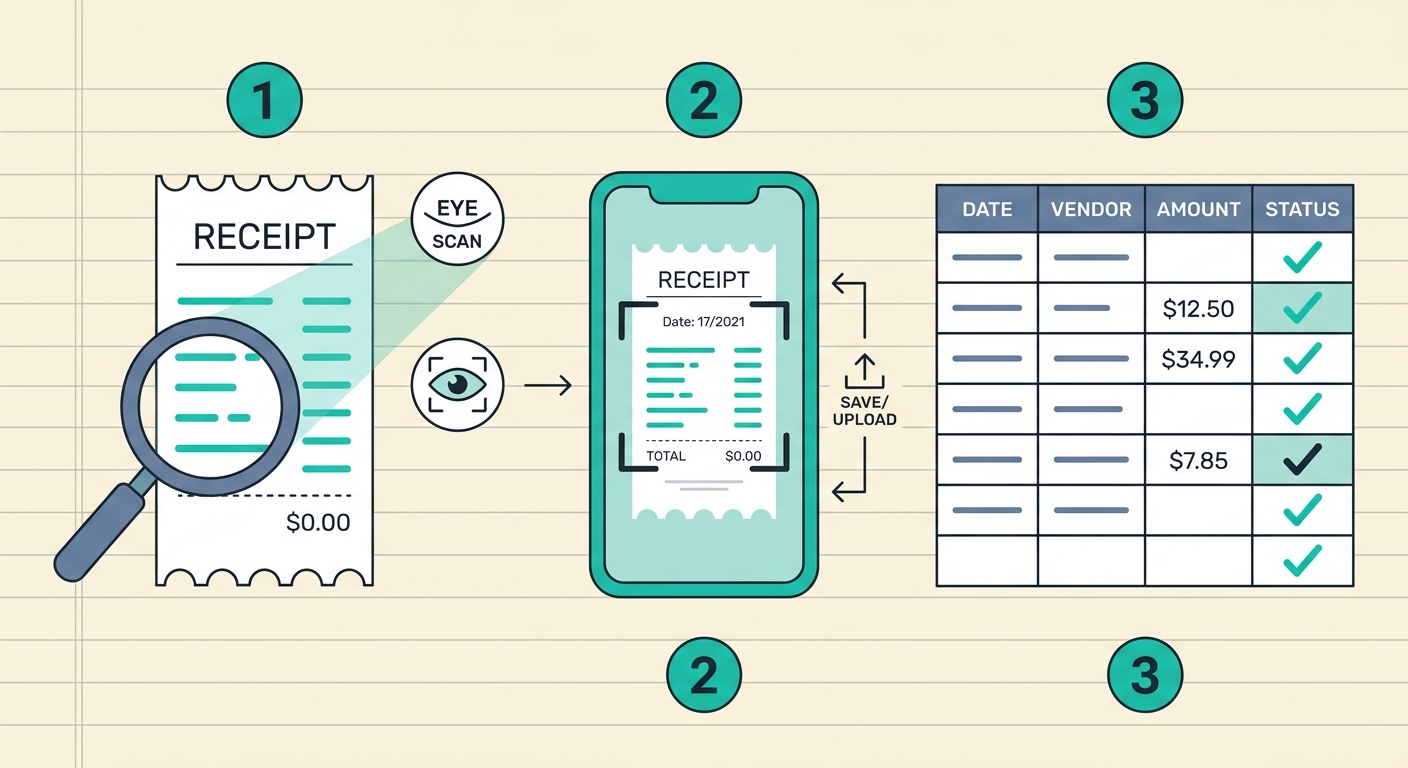
This is where the magic of modern technology truly shines. With your receipts gathered, it is time to convert them into digital images or files. SlipSheet offers flexible options for capturing your receipts, whether they are physical or already digital.
- For Paper Receipts (Using Your Smartphone Camera):
- Open the SlipSheet mobile app or web interface.
- Select the option to capture a new receipt.
- Place your receipt on a flat, well-lit surface, ensuring all details are visible and the receipt fits entirely within the frame.
- Take a clear, focused photo. SlipSheet's intelligent processing will automatically detect and crop the receipt, ready for data extraction.
- For Paper Receipts (Using a Scanner):
- Scan your receipts into high-resolution image files (JPG, PNG) or a PDF document.
- Upload these files directly to SlipSheet through its web interface. SlipSheet can process multiple receipts from a single PDF or image batch.
- For Email Receipts:
SlipSheet also excels at handling digital receipts you receive via email. Simply forward your email receipts to your unique SlipSheet email address, and the system will automatically parse the information, adding it to your data without any manual effort.
SlipSheet's advanced Optical Character Recognition (OCR) technology goes to work instantly, reading the text on your receipts and identifying key data points like vendor name, date, total amount, and line items. This automated process is the core of how to digitize paper receipts efficiently.
Phase 3: Review Extracted Fields
Even with highly accurate OCR technology, a quick review of the extracted data is always a good practice. This step ensures the integrity and accuracy of your financial records.
- Automated Data Display: After capturing or uploading, SlipSheet will present the extracted data in an easy-to-read format, typically resembling a spreadsheet row.
- Verify Key Information: Check the vendor name, date of transaction, total amount, and any other critical fields.
- Make Necessary Edits: If you spot any discrepancies, such as a misread digit or an incorrect category, you can easily edit the fields directly within SlipSheet. This might happen with very blurry or complex receipts.
- Add Additional Details: This is also an opportune moment to add custom tags, notes, or assign expenses to specific projects or categories, if your workflow requires it. SlipSheet allows for this level of customization, enhancing the utility of your digitized data.
This review phase is quick and ensures that your digital records are perfect, providing peace of mind that your expense tracking is accurate.
Phase 4: Export or Share Your Data
Once your receipts are digitized and their data verified, the final step is to integrate this information into your existing financial systems or simply store it for future reference. SlipSheet provides robust export and sharing capabilities.
- Export to Spreadsheets: The most common use case is to export your data to a spreadsheet format like CSV or XLSX. SlipSheet allows you to download your digitized receipt data directly, ready for import into Excel, Google Sheets, or any other spreadsheet program.
- Integrate with Accounting Software: Many modern receipt digitization tools, including SlipSheet, offer integrations with popular accounting software (e.g., QuickBooks, Xero, FreshBooks). This allows for seamless transfer of expense data, eliminating manual entry into multiple systems.
- Share with Accountants or Team Members: If you work with an accountant or need to share expense reports with team members, SlipSheet simplifies this process. You can generate reports or share access to specific expense data, ensuring everyone has the information they need without handling physical receipts.
- Cloud Storage: All your digitized receipts and their extracted data are securely stored in the cloud, accessible from anywhere, at any time. This provides a reliable backup and easy retrieval whenever needed.
The ability to effortlessly export and integrate your digitized receipt data is a cornerstone of efficient financial management. It closes the loop, turning raw receipt data into valuable insights and clean financial records.
Common Mistakes to Avoid When You Digitize Paper Receipts
While the process of digitizing receipts is straightforward, a few common pitfalls can hinder your efficiency or the accuracy of your data. Being aware of these can help you avoid them:
- Poor Photo Quality: Blurry, dark, or poorly cropped photos are the biggest culprits for inaccurate data extraction. Always ensure good lighting, focus, and that the entire receipt is visible.
- Delaying Digitization: Letting receipts pile up for weeks or months makes the task daunting. Implement a routine to digitize receipts daily or weekly, keeping the workload manageable.
- Not Reviewing Extracted Data: Relying solely on automated OCR without a quick human check can lead to errors in your financial records, especially with complex or damaged receipts.
- Ignoring Backup and Organization: While digitization itself is a form of backup, ensure your digital files are organized, correctly categorized, and regularly backed up to a secure cloud service.
- Discarding Physical Receipts Too Soon: Depending on local regulations and your comfort level, it might be wise to retain physical receipts for a short period after digitization, especially for high-value items or for audit purposes, until you are fully confident in your digital system.
Learning how to digitize paper receipts is a fundamental step towards modernizing your personal or business financial management. By following these steps and leveraging powerful tools like SlipSheet, you can transform a tedious chore into an effortless part of your routine. You will gain clarity over your spending, save invaluable time, and contribute to a more organized, paperless future.
Ready to say goodbye to paper clutter and hello to streamlined expense tracking? Start digitizing your receipts today with SlipSheet. Visit slipsheet.app to learn more and begin your free trial.
FAQ
Why should I digitize paper receipts?
Digitizing paper receipts saves physical space, prevents loss of important financial data, and significantly streamlines expense tracking, budgeting, and tax preparation. It also allows for easier searching and reporting of transactions.
What is the best way to digitize paper receipts?
The best way involves using a smartphone camera or scanner in conjunction with specialized receipt digitization software, like SlipSheet. This software uses OCR to automatically extract and organize key data into a usable format.
Is it legal to discard paper receipts after digitizing them?
In many jurisdictions, digitally stored receipts are legally acceptable for tax and audit purposes, provided they are clear, accurate, and readily accessible. However, it is always wise to consult with a tax professional regarding specific local regulations.
Can I digitize email receipts as well?
Yes, many advanced tools, including SlipSheet, allow you to forward email receipts directly to the service. The system then automatically parses the digital receipt, extracting the relevant transaction details without any manual effort.
How does SlipSheet help with digitizing receipts?
SlipSheet transforms receipt photos and email receipts into organized spreadsheet rows using advanced OCR technology. It extracts vendor, date, amount, and other key details, making it easy to review, edit, and export your expense data for seamless financial management.