How to Track Receipts Without an App: A Simple, Efficient Guide
In today's fast-paced world, keeping a meticulous record of your expenses is crucial for budgeting, tax preparation, and financial health. Many assume that effective receipt tracking requires downloading and managing a dedicated mobile application. However, that is not always the case. For those who prefer a streamlined, app-free approach, or who simply wish to avoid cluttering their devices, there are highly efficient methods to track receipts without an app. This guide will walk you through a simple, yet powerful process, leveraging modern web-based tools to transform your receipt chaos into organized financial data.
Whether you are a small business owner, a freelancer, or someone simply looking to manage personal finances better, the ability to digitize and categorize your spending without an additional app can save you time and reduce stress. We will explore how to gather your receipts, process them using a smart tool like SlipSheet, and then export your data for easy analysis and record-keeping.
What You Need to Track Receipts Without an App
Before diving into the step-by-step process, let us ensure you have the necessary components for an effective, app-free receipt tracking system. The beauty of this method lies in its minimal requirements and reliance on tools you likely already possess or can easily access.
- A Method for Gathering Physical Receipts: This could be a designated folder, a small box, or even a system for immediately taking photos of paper receipts. Consistency is key here.
- Access to Email for Digital Receipts: Most online purchases or service subscriptions generate email receipts. Ensure you have access to your primary email accounts.
- A Reliable Web-Based Tool: This is the cornerstone of tracking receipts without an app. Tools like SlipSheet are designed to process receipt images and emails directly through a web browser, eliminating the need for app downloads.
- A Computer or Mobile Device with Internet Access: You will need a device to access the web-based tool, upload images, or forward emails. A smartphone camera is ideal for capturing physical receipts.
- Basic Organizational Skills: A little discipline in regularly processing your receipts goes a long way in maintaining an accurate financial record.
Phase 1: Gather Your Receipts Efficiently
The first step in any successful receipt tracking system is consistent collection. This phase focuses on centralizing both your physical and digital receipts, making them ready for processing. Establishing a routine here will prevent overwhelming backlogs and ensure no expense goes untracked.
- For Physical Receipts:
- Designate a Spot: Keep a small envelope, folder, or tray specifically for paper receipts in your wallet, car, or home office.
- Immediate Capture: The most effective strategy is to capture a photo of the receipt as soon as you receive it, using your smartphone's camera. This reduces clutter and the risk of losing small slips of paper.
- Batch Processing: If immediate capture is not always feasible, aim to collect and process your physical receipts at least once a week.
- For Email Receipts:
- Create a Dedicated Folder: Set up a specific folder in your email client for all incoming digital receipts.
- Forwarding Habit: As soon as you receive an email receipt, forward it to your designated processing tool or move it to your dedicated folder for later forwarding.
- Automate if Possible: Some email clients allow you to create rules that automatically move emails from specific senders, for example, Amazon or airline companies, into your receipt folder.
Phase 2: Upload or Capture with SlipSheet
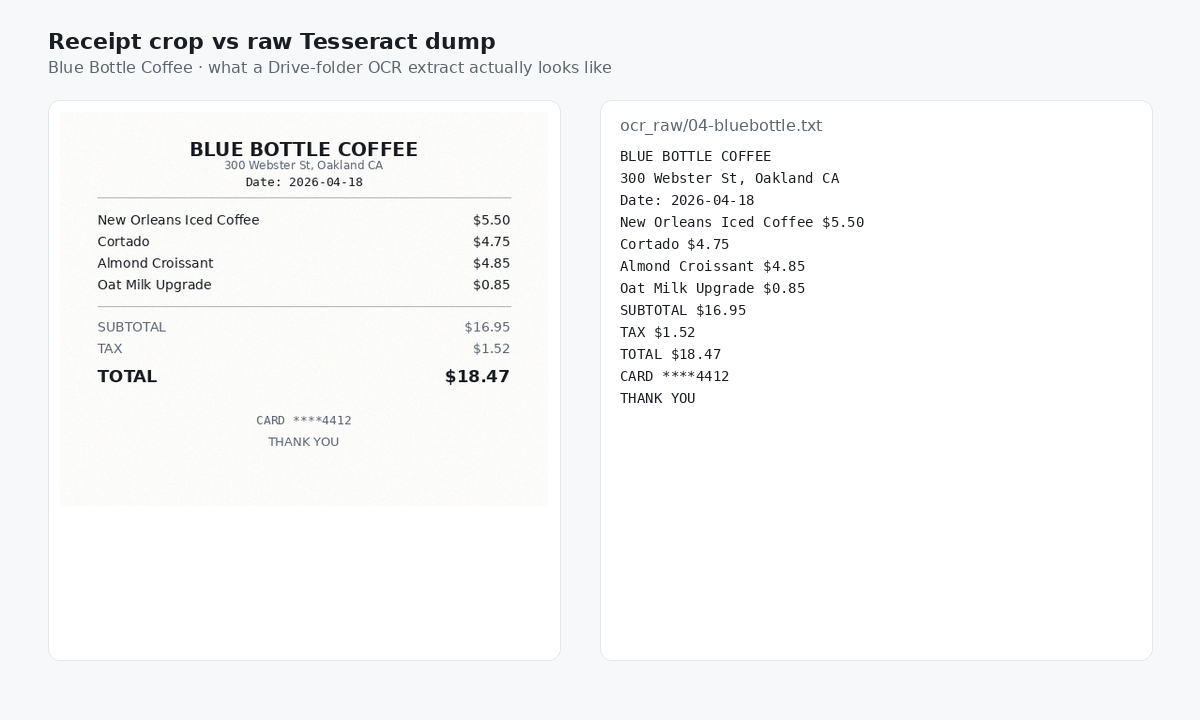
Once your receipts are gathered, the next crucial step is to digitize them and extract their valuable data. This is where a powerful web-based tool like SlipSheet truly shines, allowing you to track receipts without an app directly from your browser. SlipSheet is designed to read and interpret the information on your receipts, turning unstructured data into organized spreadsheet rows.
- For Physical Receipts:
- Snap a Photo: Using your smartphone, take a clear, well-lit photograph of each paper receipt. Ensure all details, including merchant name, date, total amount, and line items, are visible.
- Upload to SlipSheet: Log into your SlipSheet account via your web browser. You can then easily drag and drop your receipt photos directly onto the platform or use the upload button to select them from your device. SlipSheet's intelligent OCR, Optical Character Recognition, technology will then begin processing the images.
- For Email Receipts:
- Forward to SlipSheet: The process for digital receipts is even simpler. Just forward your email receipts directly to your unique SlipSheet forwarding email address. SlipSheet will automatically extract the relevant transaction details from the email body or attached PDF.
- Batch Processing: You can forward multiple email receipts at once, or even set up auto-forwarding rules in your email client to send them directly to SlipSheet as they arrive.
This phase is where the heavy lifting of data extraction occurs, all without the need for a dedicated app on your device. SlipSheet's capabilities ensure accuracy and efficiency, laying the groundwork for organized financial records.
Phase 3: Review Extracted Fields and Organize Your Data
After SlipSheet has processed your receipts, the extracted data is presented in an easy-to-read format. This phase involves a quick review and, if necessary, minor adjustments to ensure complete accuracy and proper categorization. This human touch ensures your financial records are perfect.
- Verify Extracted Information: SlipSheet will display fields such as merchant name, transaction date, total amount, tax, and sometimes even individual line items. Take a moment to quickly cross-reference this data with your original receipt or email.
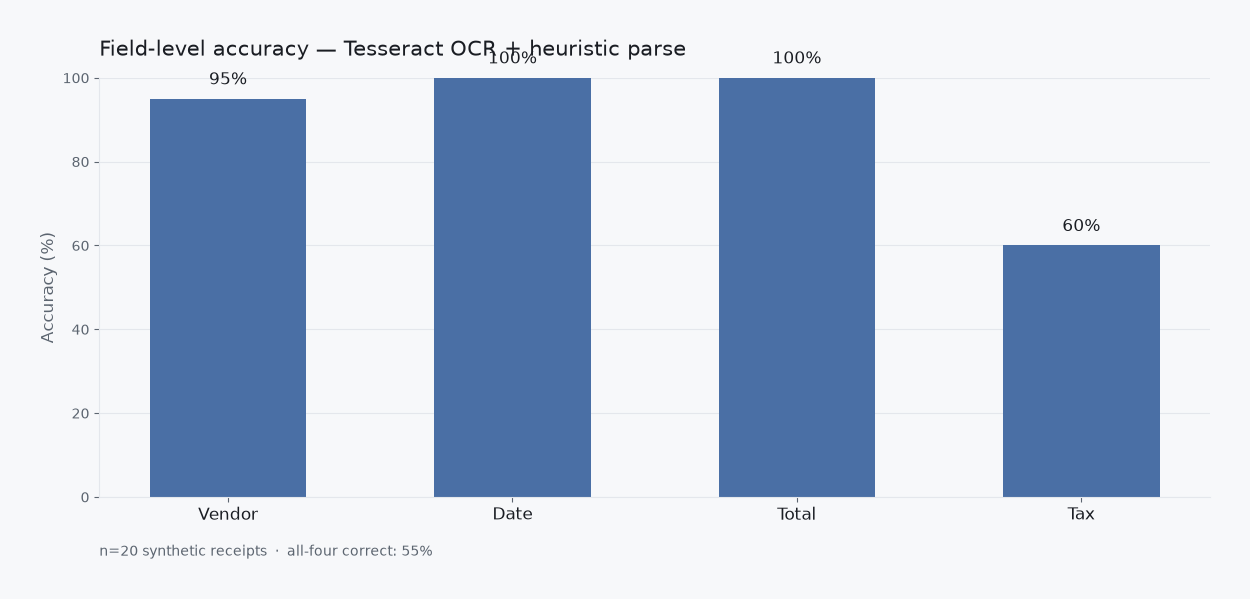
- Make Necessary Corrections: While SlipSheet boasts high accuracy, occasional discrepancies can occur, especially with blurry photos or unusually formatted receipts. The platform allows you to easily edit any field directly within your browser.
- Add Categories and Tags: This is a critical step for meaningful financial analysis. Assign categories like 'Travel', 'Office Supplies', 'Utilities', or 'Meals' to each transaction. You can also add custom tags, such as 'Client X Project' or 'Q3 Marketing', for more granular tracking.
- Attach Original Receipts (Optional): The original receipt image or email is typically linked to the extracted data within SlipSheet, providing a complete audit trail. You can review it at any time.
By taking a few moments to review and categorize, you transform raw data into actionable financial intelligence, making it effortless to track receipts without an app and gain insights into your spending habits.
Phase 4: Export or Share Your Organized Data
With your receipt data meticulously extracted, reviewed, and organized, the final phase involves making that data accessible and useful for your specific needs. The flexibility to export and share your financial records is a significant advantage of using a web-based solution like SlipSheet, enabling you to integrate it seamlessly with other financial tools or share with stakeholders.
- Export to Spreadsheet Formats: SlipSheet allows you to export your data into universally compatible formats. You can download your receipt data as a CSV, Comma Separated Values, file or an Excel spreadsheet. This makes it incredibly easy to open and analyze your expenses in programs like Microsoft Excel, Google Sheets, or Apple Numbers.
- Direct Integration with Google Sheets: For users who prefer cloud-based solutions, SlipSheet often offers direct integration with Google Sheets. This means your organized receipt data can be pushed directly into a Google Sheet, updating your financial records in real-time or on demand.
- Share with Accountants or Team Members: If you work with an accountant or manage finances with a team, you can easily share your exported spreadsheets. This eliminates the need for physical receipt handovers or cumbersome manual data entry, streamlining collaboration significantly.
- Prepare for Tax Season: Having all your expenses categorized and in a spreadsheet format simplifies tax preparation immensely. You can quickly filter by category, date range, or merchant to pull specific reports required by tax authorities, making it easier to track receipts without an app for tax purposes.
This phase completes the cycle, providing you with a clean, exportable dataset that is ready for budgeting, reporting, and ultimately, smarter financial decision-making.
Common Mistakes to Avoid When Tracking Receipts
While the process of tracking receipts without an app using tools like SlipSheet is straightforward, being aware of common pitfalls can help you maintain an even more efficient and accurate system.
- Procrastination: Letting receipts pile up is the biggest enemy of accurate tracking. A small, consistent effort daily or weekly is far more effective than trying to process a month's worth of receipts at once.
- Poor Photo Quality: When capturing physical receipts, ensure your photos are clear, well-lit, and show all relevant details. Blurry images or cut-off information can lead to errors in data extraction, requiring manual correction.
- Inconsistent Categorization: Using different terms for the same type of expense can make analysis difficult. Establish a consistent set of categories and stick to them. For example, always use 'Office Supplies' instead of sometimes 'Stationery' and other times 'Work Materials'.
- Ignoring Digital Receipts: While physical receipts often get the most attention, a significant portion of modern spending comes with email receipts. Do not neglect these; they are just as important for a complete financial picture.
- Not Backing Up Data: While SlipSheet keeps your data secure, it is always a good practice to regularly export your data to your own local drive or cloud storage as an additional backup, especially before major financial periods like tax season.
Tracking receipts without an app is not only possible, but it can also be incredibly efficient and liberating. By embracing web-based tools and establishing a few simple routines, you gain control over your financial data without adding another application to your device. This method empowers you to maintain organized records, simplify budgeting, and streamline tax preparation, all through a user-friendly browser interface.
Ready to simplify your expense management? Discover how SlipSheet can transform your receipt tracking process, turning photos and emails into organized spreadsheet rows with unparalleled ease. Visit slipsheet.app today and start tracking your receipts smarter, not harder.
FAQ
Is it really possible to track receipts without a dedicated app?
Yes, it is entirely possible. By using a web-based tool like SlipSheet, you can process receipts directly from your browser without needing to download or install a separate mobile application on your device.
How does SlipSheet handle different types of receipts?
SlipSheet efficiently processes both physical receipts, by converting photos into structured data, and digital email receipts, by extracting information directly from forwarded emails.
Can I categorize my expenses using this method?
Absolutely. After SlipSheet extracts the core data, you can easily review, edit, and add custom categories or tags to your expenses before exporting them, providing detailed insights into your spending.
What export formats are available for my receipt data?
SlipSheet typically allows you to export your organized receipt data into popular formats such as CSV, Excel spreadsheets, or directly to Google Sheets, making it easy to integrate with other financial tools.
Is my financial data secure when tracking receipts this way?
Reputable web-based tools, including SlipSheet, prioritize data security through encryption and secure protocols. Always check a service's privacy policy and security measures to ensure your data is protected.