Streamline Your Expense Tracking: The Ultimate Receipt to Excel Spreadsheet Workflow
Managing expenses can be a time-consuming chore, especially when faced with a pile of paper receipts and digital invoices. Manually entering data from each receipt into a spreadsheet is not only tedious but also prone to errors. This manual process can quickly become a bottleneck for individuals, small businesses, and large enterprises alike, hindering accurate financial reporting and efficient reimbursement. The good news is that modern tools and smart workflows can transform your chaotic receipt collection into an organized, actionable financial record. This guide will walk you through an optimized receipt to Excel spreadsheet workflow, highlighting how innovative solutions like SlipSheet can revolutionize your expense management.
Getting Started: Streamlining Your Receipt to Excel Spreadsheet Workflow
The journey from a physical receipt or an email invoice to a perfectly organized Excel spreadsheet often feels like a daunting task. However, by adopting a structured approach and leveraging the right technology, you can convert this chore into a quick, efficient process. The goal is to minimize manual data entry, reduce human error, and free up valuable time that can be better spent on core business activities or personal financial analysis. Our workflow focuses on simplicity, accuracy, and speed, ensuring your financial data is always up-to-date and easily accessible.
Before diving into the steps, understand that the core of an effective receipt to Excel spreadsheet system lies in automation. The less you touch each piece of data, the more reliable and efficient your system will be. This workflow is designed to move you from scattered receipts to a clean, categorized Excel file with minimal effort.
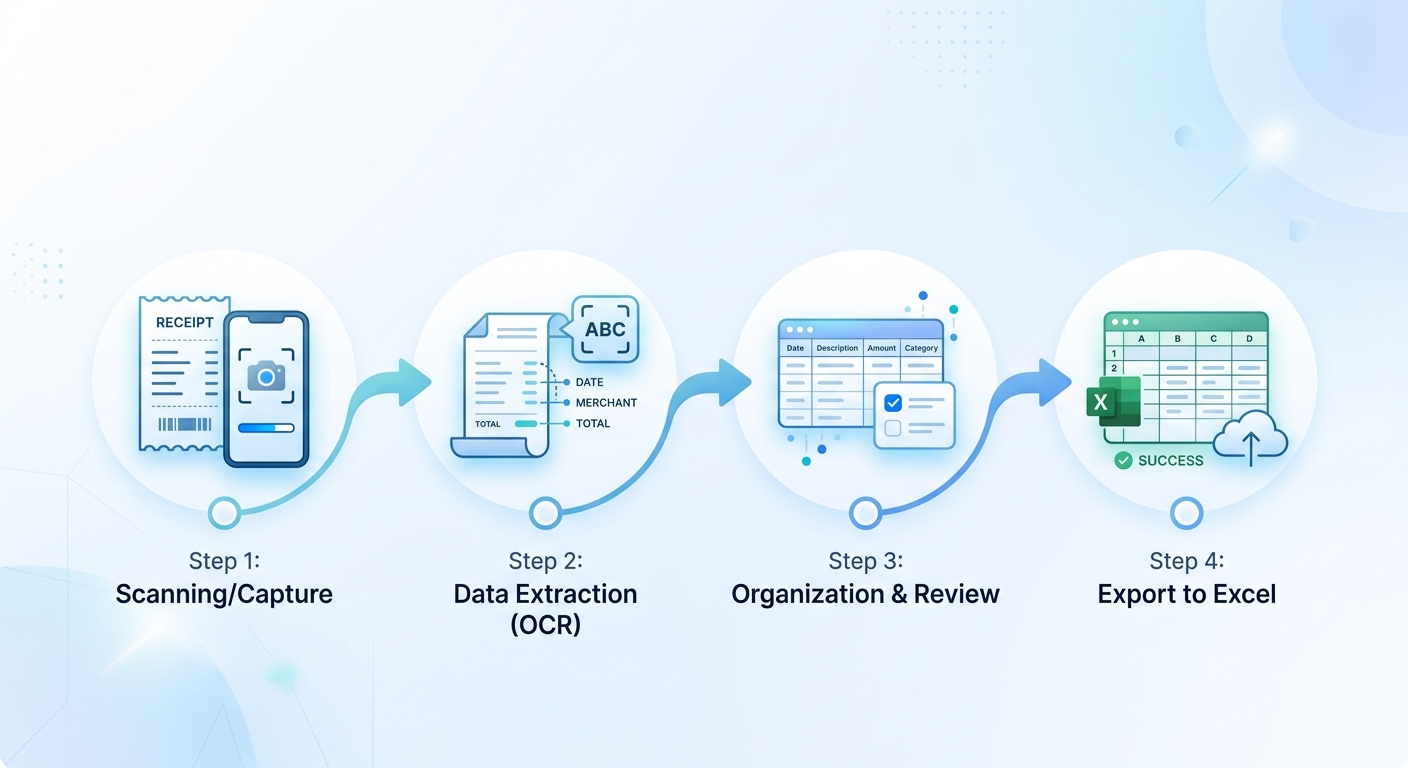
Phase 1: Effortless Receipt Collection and Capture
The first step in any robust expense management system is consistent and accurate receipt collection. This phase sets the foundation for everything that follows, so establishing good habits here is crucial. The beauty of modern solutions is their flexibility in handling various receipt formats.
- Physical Receipts: For paper receipts, immediate capture is key. Instead of letting them pile up, snap a photo using your smartphone as soon as you receive them. Ensure the photo is clear, well-lit, and captures all essential details, such as vendor name, date, total amount, and line items. Many apps, including SlipSheet, allow direct upload of these images.
- Email Receipts: Digital receipts sent via email are even easier to manage. Simply forward them to a dedicated inbox or directly upload the PDF or HTML content to your chosen expense management tool. This eliminates the need for printing and scanning, streamlining the initial capture process significantly.
- Scanned Documents: For older or bulk receipts, a flatbed scanner or a mobile scanning app can convert them into high-quality PDF or image files. Again, clarity and completeness are paramount for accurate data extraction.
The objective here is to get all your receipts into a digital format, ready for the next stage of extraction. Consistency in your capture method will greatly improve the overall efficiency of your receipt to Excel spreadsheet workflow.
Phase 2: Automated Data Extraction with SlipSheet
This is where the magic happens, transforming raw receipt images and PDFs into structured, usable data. Manual data entry is the biggest bottleneck in expense management, but tools like SlipSheet eliminate this entirely. SlipSheet is designed to intelligently read your receipts and extract all relevant information, preparing it for your spreadsheet.
Here's how SlipSheet automates the data extraction for your receipt to Excel spreadsheet conversion:
- Upload Your Receipts: Whether you have individual photos, multi-page PDFs, or forwarded email receipts, SlipSheet provides a user-friendly interface for uploading. You can drag and drop files, select them from your device, or even forward emails directly to a unique SlipSheet address.
- AI-Powered Processing: Once uploaded, SlipSheet's advanced AI and optical character recognition (OCR) technology get to work. It meticulously scans each receipt, identifying key data points such as vendor name, transaction date, total amount, currency, tax, and even individual line items. This intelligent processing ensures high accuracy, even with varying receipt formats and complexities.
- Structured Data Output: The result is clean, organized data presented in a tabular format. Instead of a messy image, you now have a spreadsheet-ready row of information for each receipt. This structured output is crucial for seamless integration with Excel.
By automating this crucial step, SlipSheet drastically cuts down the time and effort traditionally associated with preparing your receipts for a spreadsheet. It's the central pillar of an efficient receipt to Excel spreadsheet workflow, ensuring accuracy and saving countless hours.
Phase 3: Review, Refine, and Prepare for Export
Even with advanced AI, a quick review of the extracted data is always a good practice to ensure 100% accuracy, especially for critical financial records. SlipSheet makes this review process straightforward and efficient before you complete your receipt to Excel spreadsheet conversion.
- In-Platform Review: After processing, SlipSheet presents the extracted data alongside the original receipt image. This side-by-side view allows you to quickly verify the accuracy of each field. If any detail needs adjustment, you can easily edit it directly within the SlipSheet interface.
- Categorization and Tagging: Beyond basic data extraction, SlipSheet often allows you to add categories, tags, or notes to each expense. This pre-categorization is invaluable for later analysis in Excel, enabling you to sort, filter, and summarize expenses by type, project, or department without additional manual work in the spreadsheet itself.
- Consolidated Output: Once you are satisfied with the extracted and refined data, SlipSheet compiles all your processed receipts into a single, cohesive file. This file is specifically formatted for easy import into spreadsheet software.
This phase ensures that the data you export to Excel is not only accurate but also rich with additional context, making your subsequent financial analysis much more powerful. The seamless transition from review to export is a hallmark of an effective receipt to Excel spreadsheet solution.
Common Pitfalls and How to Avoid Them
While modern tools significantly simplify the receipt to Excel spreadsheet process, certain challenges can still arise. Being aware of these common pitfalls can help you maintain an efficient and accurate workflow.
- Poor Quality Receipt Images: Blurry photos, crumpled receipts, or incomplete captures can lead to inaccurate data extraction. Always ensure your receipt photos are clear, well-lit, and show all relevant information. SlipSheet's AI is robust, but clear input always yields the best results.
- Inconsistent Categorization: If you're manually categorizing expenses, ensure you use consistent naming conventions. Tools like SlipSheet often allow you to define custom categories, which helps maintain uniformity. Inconsistent categorization can make later analysis in Excel messy and unreliable.
- Procrastination: Letting receipts pile up is perhaps the biggest pitfall. A simple "capture as you go" habit prevents overwhelming backlogs and ensures timely expense reporting. Integrating SlipSheet into your daily or weekly routine makes this easy.
- Missing Essential Information: Sometimes receipts lack crucial details like the date or vendor. While SlipSheet can often infer some missing data, it's best to supplement any missing information manually during the review phase if possible, or flag it for further investigation.
By addressing these common issues proactively, you can ensure your receipt to Excel spreadsheet workflow remains smooth, accurate, and highly effective.
Conclusion: Revolutionize Your Receipt Management
Transforming a stack of receipts into an organized Excel spreadsheet no longer needs to be a source of dread. By adopting a systematic workflow, from consistent capture to automated extraction and meticulous review, you can achieve unparalleled efficiency and accuracy in your expense management. Tools like SlipSheet are pivotal in this transformation, taking the heavy lifting out of data entry and providing you with clean, actionable financial data.
Imagine the time saved, the errors avoided, and the clarity gained when all your expenses are perfectly categorized and ready for analysis. Whether for tax preparation, budget tracking, or business accounting, an optimized receipt to Excel spreadsheet workflow empowers you with better financial insights. Take control of your expenses today and experience the future of receipt management. Ready to streamline your receipt to Excel spreadsheet process? Discover how SlipSheet can help you effortlessly convert your receipts into structured data. Visit slipsheet.app to get started.
FAQ
What is the main benefit of converting receipts to an Excel spreadsheet?
The primary benefit is enhanced organization, accuracy, and efficiency in expense tracking. It allows for easy sorting, filtering, and analysis of financial data, simplifying budgeting, tax preparation, and financial reporting.
How does SlipSheet simplify the "receipt to Excel spreadsheet" process?
SlipSheet automates the data extraction from receipt photos and email receipts using AI and OCR technology. It converts unstructured receipt data into structured, spreadsheet-ready rows, significantly reducing manual data entry and potential errors.
What types of receipts can SlipSheet process?
SlipSheet can process a wide variety of receipts, including photos of paper receipts, PDF documents, and forwarded email receipts. Its AI is designed to handle diverse formats and layouts to extract key information reliably.
Can I edit the extracted data before exporting to Excel?
Yes, SlipSheet provides an in-platform review interface where you can easily verify and make any necessary edits to the extracted data. This ensures the information exported to your Excel spreadsheet is 100% accurate and categorized correctly.
Is my receipt data secure with SlipSheet?
SlipSheet prioritizes data security, employing industry-standard encryption and security protocols to protect your sensitive financial information. Your receipt data is processed and stored securely, ensuring privacy and compliance.