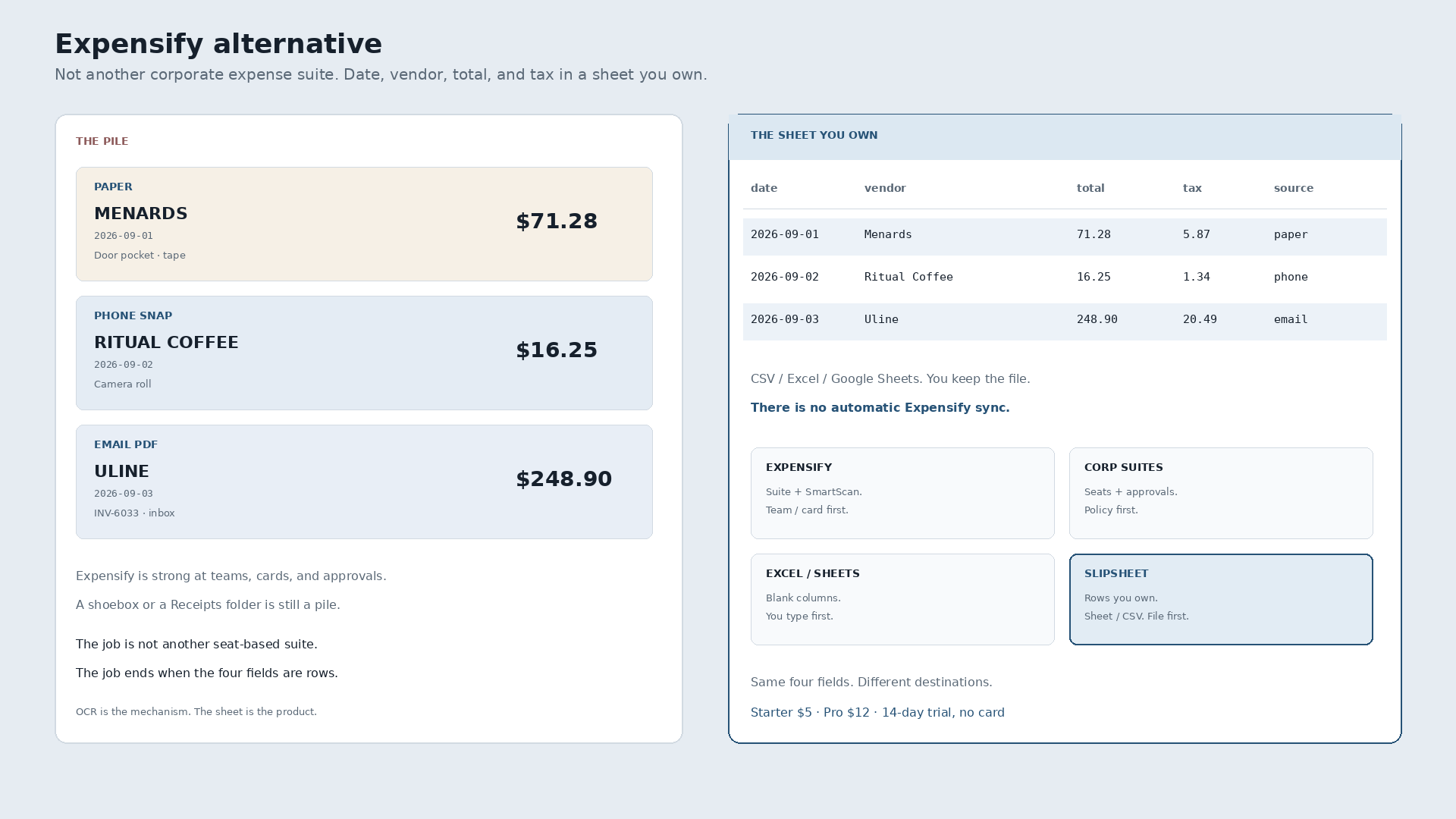
An Expensify alternative is not another corporate expense suite with policies, approvals, and per-user seats. It is receipts into spreadsheet rows you own. Expensify is strong at team workflows. The pile is still a pile until date, vendor, total, and tax are columns in Sheets, Excel, or a CSV you can download.
Paper Menards tape, $71.28, September 1, crumpled in the door pocket. Phone snap of Ritual Coffee, $16.25, September 2, still in the camera roll. Emailed Uline INV-6033, $248.90, September 3, sitting in an inbox folder named Receipts. Inside Expensify those become expenses if you finish the report and the approval chain. Outside Expensify the same week is still three files. The alternative is all three as rows in one sheet the same day.
What Expensify is for
Expensify is a corporate expense platform. SmartScan pulls digits off a slip. Corporate cards and Expensify Card sit inside the same product. Approval policies, distance rules, and team spend control keep a company from bleeding cash on the road. That is a real job when you have employees, managers, and a finance queue waiting on reports.
People who type “expensify alternative” often do not want another seat-based suite. Freelancers and one-person shops usually want the thermal out of the door pocket, the PDF out of the inbox, and the phone photo out of the camera roll, into a sheet they control — often before a bookkeeper, or because Excel and Google Sheets are already the books. A shoebox and a messy inbox are still piles.
Suite workflow versus finished rows
Capture inside Expensify feeds Expensify: reports, categories, approvals, reimbursement. Exporting a clean, editable expense table for your own sheet is a different job. A crumpled paper tape, a forwarded PDF, and a phone snap of a coffee counter all need the same four fields. OCR pulls the digits off the page. It is the mechanism, not the story. The story ends when the row is yours.
| Date | Vendor | Total | Tax | Was sitting in |
|---|---|---|---|---|
| 2026-09-01 | Menards | 71.28 | 5.87 | Paper in the door pocket |
| 2026-09-02 | Ritual Coffee | 16.25 | 1.34 | Phone camera roll |
| 2026-09-03 | Uline | 248.90 | 20.49 | Inbox folder |
That table is the destination. Not a rented gallery of scans inside someone else’s expense suite. A blank Excel workbook is still empty until those four columns exist.
Expensify vs corporate suites vs Excel / Sheets vs rows you own
Honest, not a dunk list. Four different jobs show up for this query. Concur-class and other team expense platforms are the same class of job as Expensify — seats, policies, approvals — so they are not a separate dunk column here.
| Expensify | Corporate expense suites | Excel / Sheets | Slipsheet | |
|---|---|---|---|---|
| What it is | Team expense platform with SmartScan, cards, policies | Same job class: seats, approvals, spend control | Manual columns you type yourself | Rows you own |
| Job it finishes | Report → approval → reimbursement when the org runs on it | Company spend under policy | Whatever you typed, when you typed it | Date, vendor, total, tax as a sheet or CSV you keep |
| Best when | You have a team, cards, and managers who must approve | You already bought the corporate stack | The sheet is empty and you are willing to type every line | You want Excel, Sheets, or CSV without the suite |
| Expensify later | You never left | Different vendor, same shape | Hand-type forever or start over | Import the file if you still use Expensify. No live sync. |
Pick Expensify when team spend control is the product. Pick another corporate suite when that stack is already bought. Pick a blank sheet when you will type. Pick a spreadsheet-first tool when the sheet is the product and you want the digits extracted first.
What “done” looks like
Photograph the Menards tape. Snap Ritual. Forward the Uline PDF. Review the three rows. Export. Open the file in Google Sheets or Excel, or keep the CSV. You own the file. If you later import those rows into Expensify, that is a choice, not a requirement to start. There is no automatic Expensify sync.
The plain how-to, without the competitor framing, is how to convert receipts to a spreadsheet. This page is only the Expensify alternative question.
Slipsheet Starter is $5 a month for 250 receipts. Pro is $12 a month for 1,500. Fourteen-day trial, no card. Photo, PDF, or forward to receipts@slipsheet.app, then CSV, Excel, or Sheets. You still glance at the totals. The suite is optional.
A few straight answers
Is a spreadsheet-first tool an Expensify alternative?
If you want spreadsheet rows without buying seats, cards, and approval workflows for capture alone, yes. If you need team spend control and corporate cards, stay in Expensify.
Can I use both?
Yes. Extract to a sheet for the messy week. Import or enter into Expensify when the report needs it. You do not have to pick one forever on day one. Import later is not the same as automatic sync.
Does Expensify already scan receipts?
Yes. SmartScan is a core feature inside the product, alongside cards and policies. That is not the same as a tool whose job ends at a CSV you download.
What about other corporate expense platforms?
Same job class. Seats, approvals, spend control. Use them when that destination matches. This page is for people who want the spreadsheet file first.