Slipsheet ยท Content Back to ledger
Home / Google Sheets Add-on Alternative
Google Sheets Add-on Alternative

Google Sheets Add-on Alternative

SlipSheet: The Focused Google Sheets Add-on Alternative for Receipt Management

In today's fast-paced world, efficient expense tracking is crucial for individuals, freelancers, and small businesses alike. For many, Google Sheets has become the go-to platform for financial organization, thanks to its flexibility and accessibility. A common approach to extend its capabilities is through the use of Google Sheets add-ons. These tools promise to streamline various tasks, from data analysis to project management, and yes, even receipt management.

However, what if your primary need is simply to transform a pile of receipt photos and email receipts into neat, actionable spreadsheet rows? While Google Sheets add-ons offer a broad spectrum of solutions, they aren't always the most direct or efficient path for this specific task. This is where SlipSheet emerges as a powerful, specialized google sheets add-on alternative, offering a streamlined approach to receipt-to-spreadsheet conversion that bypasses the complexities of general-purpose add-ons.

What Google Sheets Add-ons Do Well

Google Sheets add-ons are undeniably powerful, serving as a vast ecosystem designed to enhance the spreadsheet experience. Their greatest strength lies in their versatility and the sheer breadth of functions they can add to your existing Google Sheets environment. Whether you need advanced data visualization, custom email automations, CRM functionalities, or intricate data connectors, there's likely an add-on that can cater to your requirements.

These tools excel at integrating seamlessly with other Google services and third-party platforms, allowing users to build highly customized and complex workflows. For businesses with diverse needs, a well-chosen suite of add-ons can transform Google Sheets into a central hub for many operational tasks, reducing the need for multiple disparate software solutions. They empower users to tackle sophisticated data manipulation, reporting, and automation challenges directly within their spreadsheets, often saving significant time on repetitive, high-volume tasks.

Where Google Sheets Add-ons Fall Short for Receipt Management

Despite their strengths, a general-purpose Google Sheets add-on can sometimes be an overkill, or even a hindrance, when your specific problem is focused solely on receipt management. Here are a few areas where they might fall short:

  • Complexity and Learning Curve: Many powerful add-ons come with a steep learning curve. Configuring them for optimal receipt extraction often requires understanding intricate settings, formulas, or even scripting, which can be daunting for users who simply want to get their expenses organized quickly.

  • Over-Complication for Simple Needs: If your goal is just to extract vendor names, dates, and amounts from receipts, installing and setting up a comprehensive data management or OCR add-on can feel like using a sledgehammer to crack a nut. The overhead of managing a feature-rich add-on might outweigh the benefits for a straightforward task.

  • Cost and Subscription Models: While free add-ons exist, many of the more robust solutions, especially those with advanced OCR capabilities, come with monthly or annual subscription fees. These costs can add up, particularly if you only need the receipt processing functionality occasionally or as a standalone service.

  • Lack of Specialized Focus: Generic OCR or data extraction add-ons are not always optimized for the unique structure and common variations found in receipts. This can lead to inaccuracies, requiring significant manual correction, which defeats the purpose of automation.

  • Installation and Permissions: Installing add-ons often requires granting various permissions to your Google account, which can be a privacy concern for some users. Furthermore, managing multiple add-ons can sometimes slow down your Google Sheets performance.

What SlipSheet Does Differently: Focused Receipt-to-Spreadsheet Conversion

SlipSheet stands out as a dedicated google sheets add-on alternative by offering a solution specifically engineered for one purpose: transforming receipt data into spreadsheet-ready rows. Its design philosophy prioritizes simplicity, accuracy, and efficiency, addressing the core pain points of receipt management without the unnecessary baggage of a general-purpose tool.

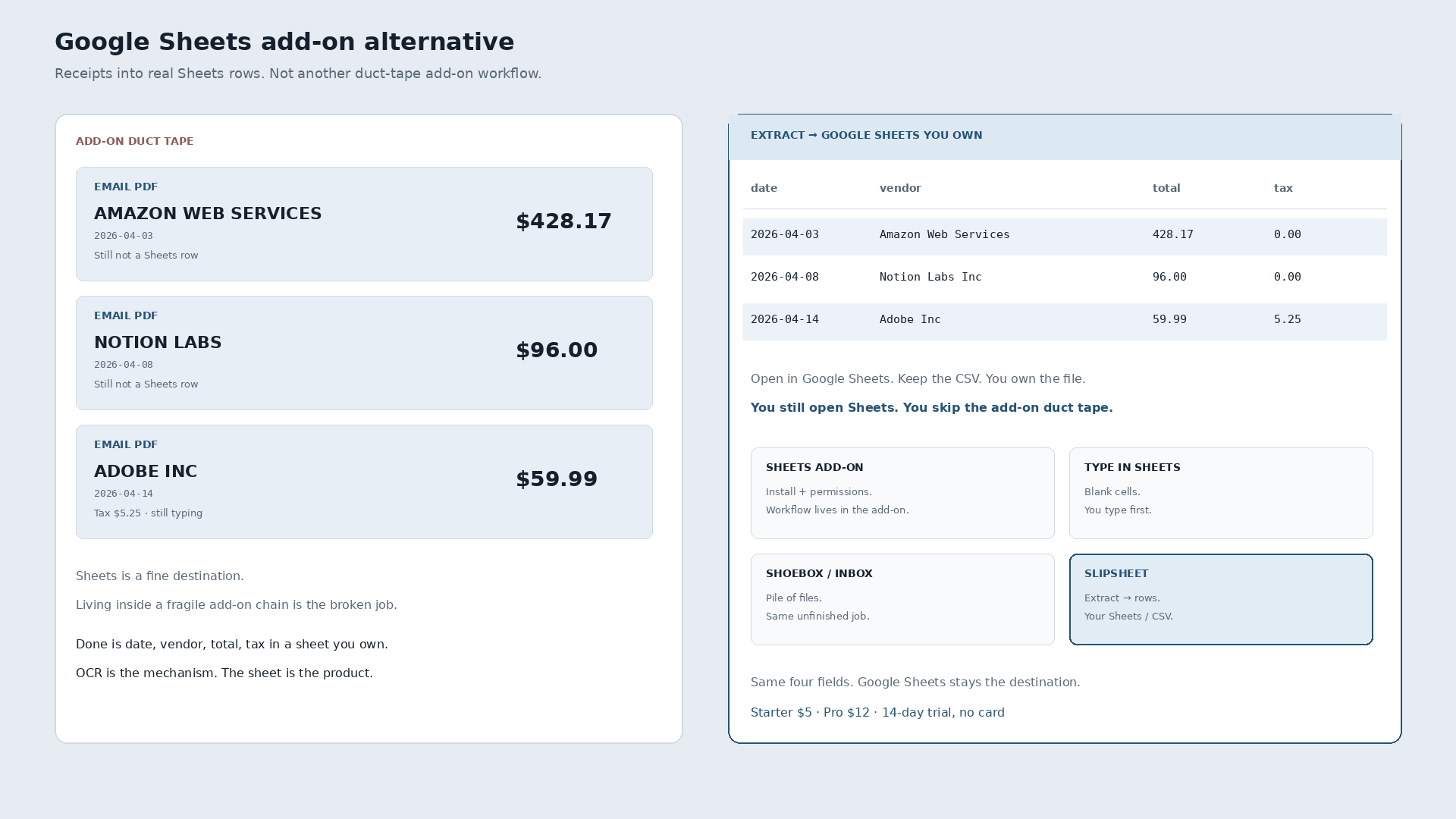
Instead of integrating directly into Google Sheets as an add-on, SlipSheet operates as a standalone web application. This means no installation, no complex configurations, and no impact on your Google Sheets performance. Users can simply upload receipt photos, forward email receipts, or even batch process multiple items. SlipSheet's advanced AI and OCR technology, specifically trained on a vast dataset of receipts, intelligently extracts crucial information such as:

  • Vendor name
  • Date of transaction
  • Total amount
  • Currency
  • Category (often automated)
  • Line items (where applicable)

The extracted data is then neatly organized into rows, ready for export as a clean CSV file. This CSV can then be effortlessly imported into Google Sheets, Excel, or any other spreadsheet software, providing a seamless bridge between your physical or digital receipts and your financial records. SlipSheet's focused approach ensures higher accuracy and a much faster turnaround time compared to trying to adapt a generic add-on for receipt parsing.

Who Should Consider SlipSheet as an Alternative?

If you find yourself nodding along to the challenges outlined above, SlipSheet might be the ideal google sheets add-on alternative for your receipt management needs. It is particularly well-suited for:

  • Small Business Owners and Freelancers: Individuals and small teams who need to track expenses accurately for tax purposes or budgeting, but don't want to invest in expensive accounting software or complex add-ons.

  • Individuals Managing Personal Finances: Anyone looking to gain better control over their spending by digitizing and categorizing personal receipts without manual data entry.

  • Users Seeking Simplicity: If you're overwhelmed by the myriad of options and complex setups of many Google Sheets add-ons, SlipSheet offers a refreshing, user-friendly experience.

  • Those Prioritizing Speed and Accuracy: If your primary concern is quickly and accurately converting receipts into structured data with minimal manual intervention, SlipSheet's specialized AI delivers superior results.

  • Anyone Frustrated with Manual Data Entry: For users tired of painstakingly typing out receipt details into a spreadsheet, SlipSheet automates this tedious process entirely.

Common Questions About Migrating to SlipSheet

Switching to a new tool, even one designed for simplicity, can raise questions. Here are some common inquiries about adopting SlipSheet as your preferred receipt management solution:

  • How easy is it to get started with SlipSheet? Getting started is incredibly simple. There's no software to install; you just visit the website, upload your receipts, and SlipSheet handles the rest. You'll receive your structured data quickly.

  • Does SlipSheet integrate directly with Google Sheets? While SlipSheet is not a Google Sheets add-on, it provides its output in a universally compatible CSV format. This file can be imported into Google Sheets with just a few clicks, making it highly compatible with your existing spreadsheet workflows.

  • What about data security and privacy? SlipSheet is built with security in mind. Your receipt data is processed securely, and the platform adheres to strict data protection standards to ensure your financial information remains private and protected.

  • Can SlipSheet handle receipts in different languages or currencies? SlipSheet's advanced AI is continuously trained to recognize various receipt formats, languages, and currencies, making it a versatile tool for diverse expense tracking needs.

  • What if I have a large volume of receipts? SlipSheet is designed to efficiently process both individual receipts and large batches, providing a scalable solution for all your expense tracking requirements, from a few items to hundreds.

For many, the search for the perfect Google Sheets add-on for receipt management leads to a realization: sometimes, a specialized, focused tool is superior to a general-purpose one. SlipSheet offers a powerful, user-friendly, and accurate google sheets add-on alternative dedicated solely to transforming your receipts into organized data. It streamlines expense tracking, saves time, and reduces errors, allowing you to focus on what truly matters.

Ready to simplify your receipt management? Experience the difference a dedicated solution can make. Visit slipsheet.app today and take control of your expenses with unprecedented ease.

FAQ

What is SlipSheet, and how does it differ from a Google Sheets add-on?

SlipSheet is a specialized tool designed to convert receipt photos and email receipts into structured spreadsheet data. Unlike a general Google Sheets add-on, it offers a focused, streamlined solution specifically for receipt management, without requiring installation or complex setup within Sheets itself.

What kind of data can SlipSheet extract from my receipts?

SlipSheet accurately extracts key information such as the vendor name, date of transaction, total amount, currency, and often categorizes expenses automatically. This data is then formatted into neat rows, ready for export.

Is SlipSheet easy to use, especially if I'm not tech-savvy?

Yes, SlipSheet is designed for ultimate simplicity. You just upload your receipt images or forward email receipts, and the tool handles the data extraction, providing you with a clean CSV file that can be easily imported into Google Sheets or any other spreadsheet software.

How does SlipSheet ensure the accuracy of the extracted data?

SlipSheet utilizes advanced AI and OCR technology specifically trained on a vast array of receipt formats. This specialization allows it to achieve high accuracy in identifying and extracting relevant financial details, minimizing errors compared to manual entry.

Can I use SlipSheet if I already have a complex Google Sheets setup for my finances?

Absolutely. SlipSheet acts as a powerful pre-processor for your receipt data. It delivers clean, structured CSV files, which can be effortlessly imported and integrated into your existing Google Sheets setup, enhancing your current workflow without disrupting it.

Ready to stop typing receipts?

Open your ledger.

14-day trial. No card. Cancel anytime. Your receipts write themselves while you do literally anything else.