A Hubdoc alternative is not another Xero-linked document capture suite. It is receipts into spreadsheet rows you own. Hubdoc’s job is bills and receipts into the Xero / accountant path. That is a real job when you already live there. The pile is still a pile until date, vendor, total, and tax are columns in Sheets, Excel, or a CSV you can download.
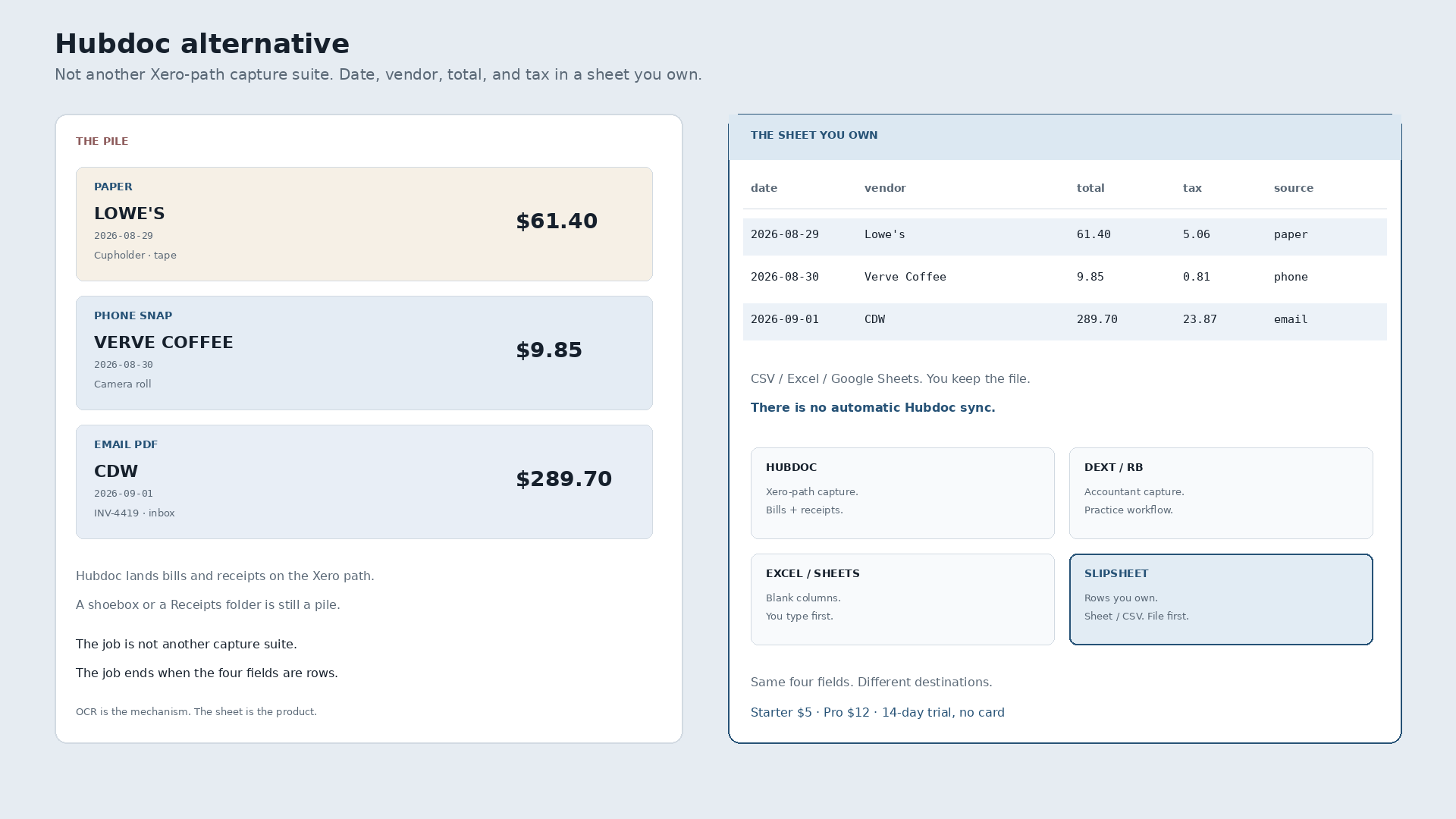
Paper Lowe’s tape, $61.40, August 29, crumpled in the cupholder. Phone snap of Verve Coffee, $9.85, August 30, still in the camera roll. Emailed CDW invoice INV-4419, $289.70, September 1, sitting in an inbox folder named Receipts. Inside Hubdoc those become supplier documents on the Xero path. Outside Hubdoc the same week is still three files. The alternative is all three as rows in one sheet the same day.
What Hubdoc is for
Hubdoc is document capture aimed at Xero: snap or upload bills and receipts, extract, push them toward the bookkeeper and the Xero ledger. That path is real when your firm already runs books there. It is not a tool whose destination is a spreadsheet file you own.
Slipsheet is not Hubdoc, Dext, Datamolino, or AutoEntry. Those products are built for accountant capture and practice workflows. People who type “hubdoc alternative” often do not want another gallery of supplier docs. They want the thermal out of the cupholder, the PDF out of the inbox, and the phone photo out of the camera roll, into a sheet they control — often before a bookkeeper, or because Excel and Google Sheets are already the books. A shoebox and a messy inbox are still piles.
Xero-path capture versus finished rows
Capture inside Hubdoc feeds the Xero Hubdoc path. Exporting a clean, editable expense table for your own sheet is a different job. A crumpled paper tape, a forwarded PDF, and a phone snap of a coffee counter all need the same four fields. OCR pulls the digits off the page. It is the mechanism, not the story. The story ends when the row is yours.
| Date | Vendor | Total | Tax | Was sitting in |
|---|---|---|---|---|
| 2026-08-29 | Lowe’s | 61.40 | 5.06 | Paper in the cupholder |
| 2026-08-30 | Verve Coffee | 9.85 | 0.81 | Phone camera roll |
| 2026-09-01 | CDW | 289.70 | 23.87 | Inbox folder |
That table is the destination. Not a rented gallery of scans inside someone else’s capture suite. A blank Excel workbook is still empty until those four columns exist.
Hubdoc vs Dext / Receipt Bank vs Excel / Sheets vs rows you own
Honest, not a dunk list. Four different jobs show up for this query. Xero is the ledger destination for Hubdoc, not a villain. Accountant-capture tools like Datamolino or AutoEntry are the same class of job as Dext and Hubdoc — practice workflow, not a spreadsheet destination — so they are not a separate dunk column here.
| Hubdoc | Dext / Receipt Bank | Excel / Sheets | Slipsheet | |
|---|---|---|---|---|
| What it is | Xero-linked document capture | Pre-accounting capture for bookkeepers | Manual columns you type yourself | Rows you own |
| Job it finishes | Bills and receipts into the Xero Hubdoc path | Supplier docs into the accountant’s stack | Whatever you typed, when you typed it | Date, vendor, total, tax as a sheet or CSV you keep |
| Best when | You already run books in Xero with Hubdoc | You and your bookkeeper already live in Dext | The sheet is empty and you are willing to type every line | You want Excel, Sheets, or CSV without the capture suite |
| Xero later | You never left | Different stack | Hand-type forever or start over | Import the file if you still use Xero. No live sync. |
Pick Hubdoc when Xero document capture is the product. Pick Dext when the bookkeeper stack is the product. Pick a blank sheet when you will type. Pick a spreadsheet-first tool when the sheet is the product and you want the digits extracted first.
What “done” looks like
Photograph the Lowe’s tape. Snap Verve. Forward the CDW PDF. Review the three rows. Export. Open the file in Google Sheets or Excel, or keep the CSV. You own the file. If you later import those rows into Hubdoc or Xero, that is a choice, not a requirement to start. There is no automatic Hubdoc sync.
The plain how-to, without the competitor framing, is how to convert receipts to a spreadsheet. This page is only the Hubdoc alternative question.
Slipsheet Starter is $5 a month for 250 receipts. Pro is $12 a month for 1,500. Fourteen-day trial, no card. Photo, PDF, or forward to the inbox at receipts@slipsheet.app, then CSV, Excel, or Sheets. You still glance at the totals. The capture suite is optional.
A few straight answers
Is a spreadsheet-first tool a Hubdoc alternative?
If you want spreadsheet rows without buying another Xero-linked document capture suite, yes. If you need Hubdoc’s Xero path, stay in Hubdoc.
Does this replace Xero?
No. Xero is the books. Hubdoc feeds that path. This page is for people who want the spreadsheet file first — rows you own — not a dunk on Xero.
Can I use both?
Yes. Extract to a sheet for the messy week. Import or enter into Hubdoc when the Xero path needs it. You do not have to pick one forever on day one. Import later is not the same as automatic sync.
What about Dext / Receipt Bank?
Same class of job as Hubdoc: accountant-facing capture, different stack. Use it when that bookkeeper workflow matches. This page is for people who want the spreadsheet file first.