A Receipt Bank alternative is not another pre-accounting capture platform. It is receipts into spreadsheet rows you own. Receipt Bank rebranded to Dext Prepare in 2021; people still search the old name. Dext can pull a slip into a bookkeeper workflow. The pile is still a pile until date, vendor, total, and tax are columns in Sheets, Excel, or a CSV you can download.
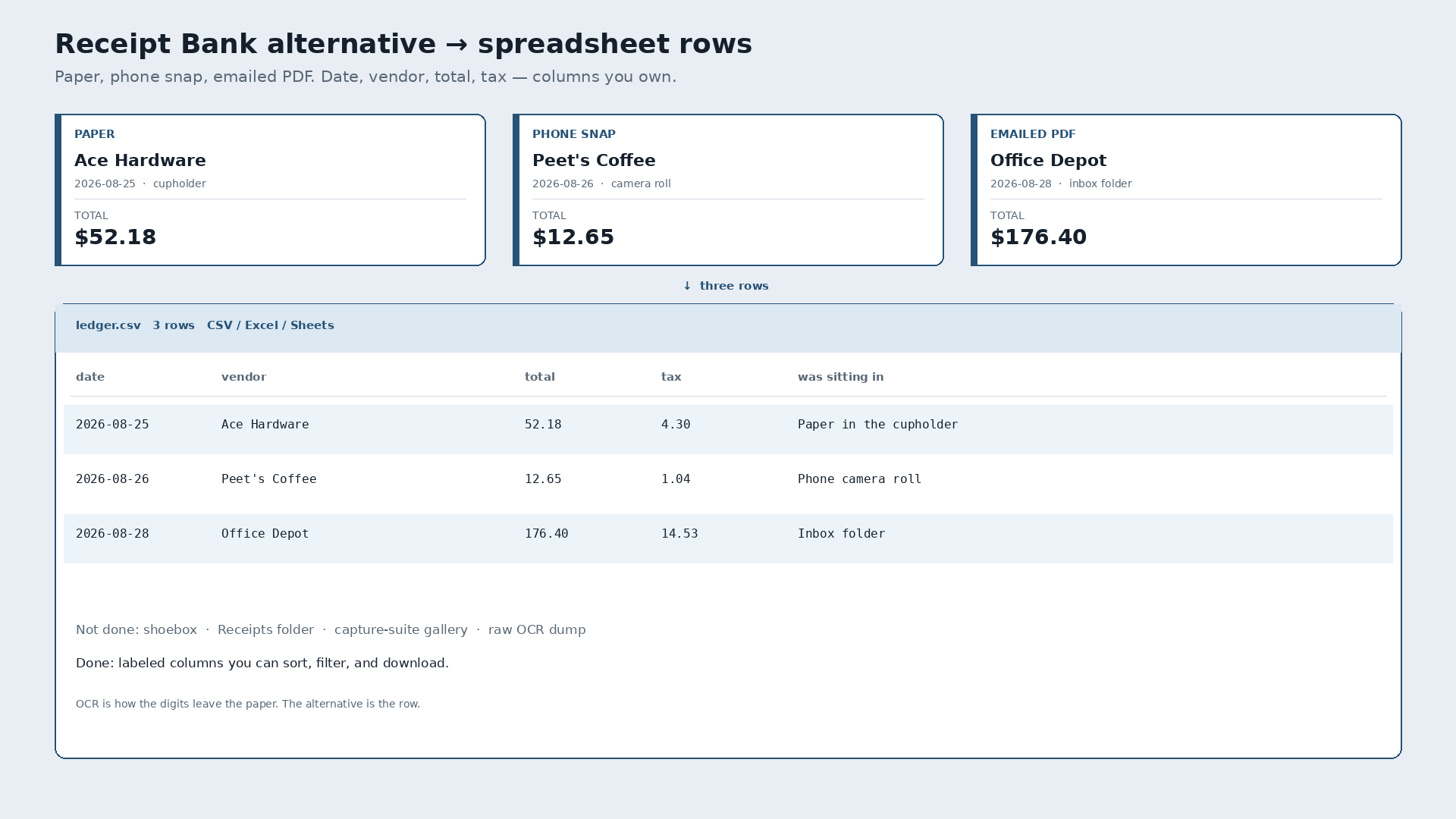
Paper Ace Hardware tape, $52.18, August 25, crumpled in the cupholder. Phone snap of Peet’s Coffee, $12.65, August 26, still in the camera roll. Emailed Office Depot INV-8821, $176.40, August 28, sitting in an inbox folder named Receipts. Inside Dext those become supplier documents for the accountant. Outside Dext the same week is still three files. The alternative is all three as rows in one sheet the same day.
What Receipt Bank / Dext is for
Receipt Bank became Dext Prepare. It is a pre-accounting capture product: snap or upload, extract, push documents toward the bookkeeper and the accounting suite. That is a real job when your firm lives in that stack. It is not a tool whose destination is a spreadsheet file you own.
Slipsheet is not Dext, Hubdoc, Datamolino, or AutoEntry. Those products are built for accountant capture and practice workflows. People who type “receipt bank alternative” usually do not want another pre-accounting platform. They want the thermal out of the cupholder, the PDF out of the inbox, and the phone photo out of the camera roll, into a sheet they control — often before a bookkeeper, or because Excel and Google Sheets are already the books. A shoebox and a messy inbox are still piles.
Capture suite versus finished rows
Capture inside Dext feeds the Dext / accountant path. Exporting a clean, editable expense table for your own sheet is a different job. A crumpled paper tape, a forwarded PDF, and a phone snap of a coffee counter all need the same four fields. OCR pulls the digits off the page. It is the mechanism, not the story. The story ends when the row is yours.
| Date | Vendor | Total | Tax | Was sitting in |
|---|---|---|---|---|
| 2026-08-25 | Ace Hardware | 52.18 | 4.30 | Paper in the cupholder |
| 2026-08-26 | Peet’s Coffee | 12.65 | 1.04 | Phone camera roll |
| 2026-08-28 | Office Depot | 176.40 | 14.53 | Inbox folder |
That table is the destination. Not a rented gallery of scans inside someone else’s capture suite. A blank Excel workbook is still empty until those four columns exist.
Dext / Receipt Bank vs Hubdoc vs Excel / Sheets vs rows you own
Honest, not a dunk list. Four different jobs show up for this query. Accountant-capture tools like Datamolino or AutoEntry are the same class of job as Dext and Hubdoc — practice workflow, not a spreadsheet destination — so they are not a separate dunk column here.
| Dext (Receipt Bank) | Hubdoc | Excel / Sheets | Slipsheet | |
|---|---|---|---|---|
| What it is | Pre-accounting capture for bookkeepers | Xero-linked document capture | Manual columns you type yourself | Rows you own |
| Job it finishes | Supplier docs into the accountant’s stack | Bills and receipts into the Xero Hubdoc path | Whatever you typed, when you typed it | Date, vendor, total, tax as a sheet or CSV you keep |
| Best when | You and your bookkeeper already live in Dext | You already run books in Xero with Hubdoc | The sheet is empty and you are willing to type every line | You want Excel, Sheets, or CSV without the capture suite |
| Dext later | You never left | Different stack | Hand-type forever or start over | Import the file if you still use Dext. No live sync. |
Pick Dext when the bookkeeper stack is the product. Pick Hubdoc when Xero document capture is the product. Pick a blank sheet when you will type. Pick a spreadsheet-first tool when the sheet is the product and you want the digits extracted first.
What “done” looks like
Photograph the Ace Hardware tape. Snap Peet’s. Forward the Office Depot PDF. Review the three rows. Export. Open the file in Google Sheets or Excel, or keep the CSV. You own the file. If you later import those rows into Dext, that is a choice, not a requirement to start. There is no automatic Dext sync.
The plain how-to, without the competitor framing, is how to convert receipts to a spreadsheet. This page is only the Receipt Bank alternative question.
Slipsheet Starter is $5 a month for 250 receipts. Pro is $12 a month for 1,500. Fourteen-day trial, no card. Photo, PDF, or forward to receipts@slipsheet.app, then CSV, Excel, or Sheets. You still glance at the totals. The capture suite is optional.
A few straight answers
Is a spreadsheet-first tool a Receipt Bank alternative?
If you want spreadsheet rows without buying another pre-accounting capture platform, yes. If you need the Dext bookkeeper workflow, stay in Dext.
Is Receipt Bank the same as Dext?
Yes for this search. Receipt Bank rebranded to Dext Prepare in 2021. Old bookmarks and queries still say Receipt Bank. The product job — accountant-facing capture — is the same class of tool.
Can I use both?
Yes. Extract to a sheet for the messy week. Import or enter into Dext when the books need it. You do not have to pick one forever on day one. Import later is not the same as automatic sync.
What about Hubdoc?
Different job. Hubdoc is document capture aimed at the Xero path. Use it when that destination matches. This page is for people who want the spreadsheet file first.