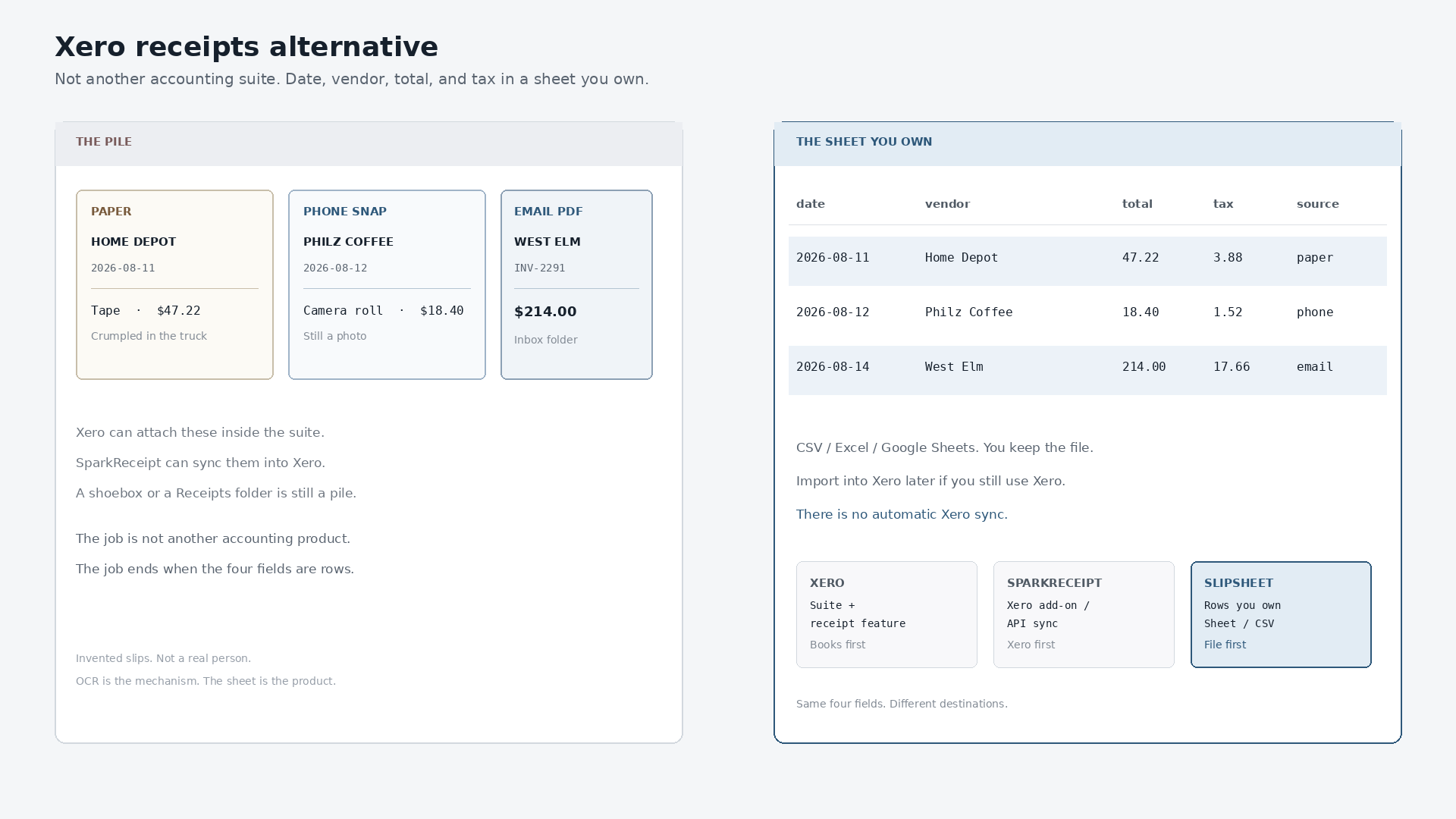
Managing receipts is a universal challenge for businesses and individuals alike. Whether you are a freelancer tracking expenses, a small business owner preparing for tax season, or simply someone trying to keep a tighter grip on personal finances, the sheer volume of paper and digital receipts can be overwhelming. Tools like Xero have revolutionized accounting with their integrated AI features, promising to streamline this process. However, for those seeking a more focused, direct, and perhaps more cost-effective solution specifically for turning receipts into actionable spreadsheet data, exploring a dedicated xero receipts ai alternative might be the perfect next step.
While Xero offers a comprehensive accounting suite, its receipt management features are designed to fit within that broader ecosystem. But what if your primary need is simply to convert receipts, both physical and digital, into spreadsheet rows without the full complexity of an accounting platform? This is where specialized tools like SlipSheet come into play, offering a powerful, streamlined approach to receipt data extraction and export.
What Xero AI Does Well for Receipts
Xero, as a leading cloud accounting platform, provides robust features for receipt management, often powered by artificial intelligence. For many businesses, these capabilities are invaluable. Here’s a look at what Xero's AI typically excels at:
- Seamless Integration with Accounting: Xero's receipt features are deeply embedded within its accounting software. This means that once a receipt is captured, its data can be automatically matched to bank transactions, categorized, and posted directly to the general ledger.
- Automated Data Extraction: The AI can read key information from receipt images, such as vendor name, date, and total amount, significantly reducing manual data entry.
- Smart Categorization and Reconciliation: Xero's system often learns from past entries, suggesting categories for new transactions and simplifying the bank reconciliation process.
- Comprehensive Expense Management: For businesses that use Xero for their entire financial management, the receipt tools provide an end-to-end solution for tracking and reporting expenses within one platform.
- Multi-User Access: Teams can collaborate on expense submissions, approvals, and processing, making it suitable for businesses with multiple employees incurring expenses.
These features make Xero an excellent choice for businesses that require a fully integrated accounting and expense management system, where the receipt data flows directly into the financial statements.
Where Xero's AI Might Fall Short for Simple Export Needs
Despite its strengths, Xero's integrated approach might not be the ideal fit for every user, especially those whose primary goal is efficient data extraction and export to a spreadsheet. Here are some scenarios where a dedicated xero receipts ai alternative could prove more beneficial:
- Overkill for Basic Data Extraction: If your main requirement is simply to get receipt data into a spreadsheet, Xero's full accounting suite can feel like using a sledgehammer to crack a nut. The extensive features might add unnecessary complexity.
- Cost Considerations: Accessing Xero's receipt AI often means subscribing to a broader Xero plan, which can be a significant investment if you only need the receipt processing functionality. For users with simpler needs, this cost might not be justified.
- Learning Curve for Non-Accountants: While user-friendly, Xero still operates within an accounting framework. Individuals or small businesses not deeply involved in accounting might find the terminology and workflow more intricate than necessary for basic expense tracking.
- Focus on Internal Ecosystem: Xero's strength lies in keeping data within its own system for accounting purposes. If you need maximum flexibility to export data into various spreadsheet formats, or to integrate with other non-Xero specific tools, its primary focus might not align perfectly.
- Limited Raw Data Export Flexibility: While Xero allows for data export, the primary design is for internal accounting use. A specialized tool might offer more direct, customizable spreadsheet exports tailored purely for data analysis or import into other diverse systems.
For users who prioritize simplicity, flexibility in data export, and a lower cost for a specific function, a focused alternative often presents a compelling case.
How SlipSheet Offers a Different Approach
Enter SlipSheet, a powerful xero receipts ai alternative designed with a singular, clear purpose: to transform your receipt photos and email receipts directly into organized spreadsheet rows. SlipSheet doesn't aim to be an accounting system, it aims to be the best at what it does, extracting data from receipts and making it ready for your spreadsheets. Here's how it differs:
- Hyper-Focused Functionality: SlipSheet concentrates solely on receipt data extraction and export. This singular focus allows for a highly optimized, intuitive experience without the distractions of a full accounting suite.
- Simplicity and Speed: The user interface is designed for maximum ease of use. You simply upload a receipt photo or forward an email receipt, and SlipSheet's AI gets to work, quickly extracting key details.
- Versatile Receipt Handling: Whether it's a crumpled paper receipt photo from your phone or a digital receipt in your inbox, SlipSheet handles both seamlessly, ensuring all your expense sources are covered.
- Direct Spreadsheet Export: The core output is a clean, organized spreadsheet. You can export your data to CSV, directly to Google Sheets, or other common formats, providing unparalleled flexibility for how you use your data.
- Cost-Effective: By offering a specialized service, SlipSheet often provides a more affordable solution for individuals and small businesses whose primary need is efficient receipt-to-spreadsheet conversion, without paying for unused accounting features.
- Designed for Data Flexibility: SlipSheet understands that not everyone uses Xero. Its output is generic and adaptable, perfect for importing into any accounting software, personal finance tracker, or custom database you might use.
SlipSheet empowers users to regain control over their expense data, turning a pile of receipts into structured information with minimal effort, making it a strong contender for those seeking a streamlined process.
Who Should Consider SlipSheet as a Xero Receipts AI Alternative?
If you've been using Xero's receipt features, or are considering them, but find yourself in one of these situations, SlipSheet might be the ideal xero receipts ai alternative for your needs:
- Freelancers and Solo Entrepreneurs: You need a straightforward way to track business expenses for tax purposes or personal budgeting, without the overhead of a full accounting system.
- Small Businesses with Simple Expense Tracking: Your business uses a different accounting system, or perhaps just spreadsheets, for its primary accounting, and you need a dedicated tool for efficient receipt data entry.
- Individuals Managing Personal Finances: For those who want to meticulously track personal spending, SlipSheet offers an easy way to digitize and organize every receipt.
- Users Prioritizing Spreadsheet Export: Your main goal is to get clean, structured data into a spreadsheet for analysis, reporting, or custom integration with other tools.
- Budget-Conscious Users: You want a powerful receipt scanning solution without the cost associated with a comprehensive accounting software subscription.
- Anyone Seeking Simplicity: If you prefer a tool that does one thing exceptionally well, without unnecessary complexity or features you won't use.
SlipSheet is built for efficiency and directness, making it an excellent choice for anyone who values getting their receipt data into a spreadsheet quickly and accurately, without the broader scope of a full accounting package.
Common Questions About Switching Receipt Management Tools
Considering a shift in how you manage your receipts can bring up several questions. Here are some common inquiries about adopting a new tool like SlipSheet:
- Is it difficult to transition from Xero's receipt system? Transitioning to SlipSheet is designed to be simple. Since SlipSheet focuses on raw data extraction, there's no complex migration of accounting data, only a change in your receipt capture workflow.
- How do I get my historical receipts into SlipSheet? For historical data, you can typically upload existing receipt images or forward email receipts to SlipSheet for processing. The system is built to handle new and past receipts efficiently.
- Can SlipSheet integrate with my existing accounting software? While SlipSheet does not offer direct, real-time accounting integrations like Xero does internally, it provides highly flexible spreadsheet exports. This data can then be easily imported into virtually any accounting software, including Xero, QuickBooks, or custom systems, using their respective import functions.
- Will SlipSheet help me categorize my expenses? SlipSheet extracts the core data from your receipts. While it doesn't offer AI-driven categorization for accounting purposes, you can easily add categorization columns in your exported spreadsheet, giving you complete control over your data structure.
- Is my data secure with SlipSheet? Reputable receipt management tools, including SlipSheet, prioritize data security through encryption and robust privacy policies, ensuring your financial information is protected.
Choosing the right tool depends on your specific needs. For those who value focused efficiency and direct spreadsheet export above all else, SlipSheet stands out as a powerful and practical xero receipts ai alternative.
In conclusion, while Xero provides an excellent, integrated solution for comprehensive accounting and expense management, not everyone requires its full suite of features for receipt processing. For individuals, freelancers, and small businesses seeking a straightforward, cost-effective, and highly efficient way to transform receipt photos and email receipts into organized spreadsheet rows, SlipSheet offers a compelling alternative. Its dedication to core receipt data extraction, coupled with flexible export options, makes it the ideal tool for streamlining your expense tracking. Discover how SlipSheet can simplify your receipt management today. Visit slipsheet.app to learn more and get started.
FAQ
Is SlipSheet a full accounting software like Xero?
No, SlipSheet is a specialized tool focused purely on extracting data from receipts and converting it into spreadsheet rows. It does not offer accounting features like bank reconciliation, invoicing, or financial reporting.
What types of receipts can SlipSheet process?
SlipSheet is designed to process both physical receipt photos captured with your phone and digital email receipts. You simply upload or forward them to the platform.
Can I import data from SlipSheet into Xero or other accounting software?
Yes, SlipSheet exports your receipt data into flexible spreadsheet formats like CSV or directly to Google Sheets. This data can then be easily imported into Xero, QuickBooks, or almost any other accounting software using their respective import functions.
What makes SlipSheet a good alternative to Xero's receipt AI for certain users?
SlipSheet offers a simpler, more focused, and often more cost-effective solution for users whose primary need is efficient receipt data extraction and direct export to spreadsheets, without the complexity or cost of a full accounting suite.
Is SlipSheet suitable for large businesses or just small businesses and individuals?
SlipSheet is ideal for small businesses, freelancers, and individuals who need an efficient, straightforward way to digitize and organize their expenses into spreadsheets. Its simplicity and focus make it highly effective for these user groups.